cancel
Showing results for 
Search instead for 
Did you mean: 

Learn from the best! Meet the four finalists headed to the FINALS of the Power BI Dataviz World Championships! Register now

Reply
Anonymous
Not applicable

Dynamic Date Filter Active/Inactive Courses

Hi, I am trying to figure out how to display only "Active" courses when using a Year/Quarter/Month date slicer. So, if I select a specific quarter or year, I only want to display data for courses that are active within the date range.


I have a course list with course names and "Inactivation Date" field, but am unsure how to apply the logic I want to use for this.


Please let me know if this question makes sense or if I can explain it differently. 


Thank you!
Sarah

3 REPLIES 3
v-zhangti
Community Support
Community Support

Hi, @Anonymous 


Can you provide sample data for testing? Sensitive information can be removed in advance. What kind of expected results do you expect? You can also show it with pictures or Excel. I look forward to your response.


Best Regards,

Community Support Team _Charlotte

If this post helps, then please consider Accept it as the solution to help the other members find it more quickly.

Anonymous
Not applicable

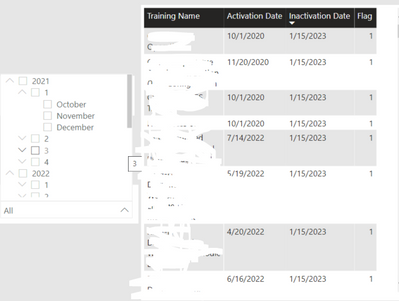
sarahkane_0-1679316250863.pngHi @v-zhangti , I have a table and the flag column is the calculated measure I want to use. When selecting conescutive dates in the date filter, I would like to flag whether the Training Name was active or inactive, and filter out all inactive courses. Please let me know if this helps or if I can provide something else to be more helpful for my question. Thank you!


Anonymous
Not applicable

I am now realizing I will need to make use of the "Activation Date" field to filter out courses that have not been active if the date filter range is selected and the course did not exist yet

Helpful resources

Announcements
Join our Fabric User Panel

Join our Fabric User Panel

Share feedback directly with Fabric product managers, participate in targeted research studies and influence the Fabric roadmap.

February Power BI Update Carousel

Power BI Monthly Update - February 2026

Check out the February 2026 Power BI update to learn about new features.

FabCon Atlanta 2026 carousel

FabCon Atlanta 2026

Join us at FabCon Atlanta, March 16-20, for the ultimate Fabric, Power BI, AI and SQL community-led event. Save $200 with code FABCOMM.