Join us at FabCon Atlanta from March 16 - 20, 2026, for the ultimate Fabric, Power BI, AI and SQL community-led event. Save $200 with code FABCOMM.
Register now!Vote for your favorite vizzies from the Power BI Dataviz World Championship submissions. Vote now!
Hello,
I need help charting tickets based on a dyamnic date where the user can select a date and see the status of open tickets at that point of time, then i need to chart a monthly graph of the aggregate open tickets. Is that possible?
| Open Date | Close Date | Status |
| 9/1/22 | 11/1/22 | Closed |
| 9/1/22 | Open | |
| 9/1/22 | 10/1/22 | Closed |
| 10/15/22 | 11/1/22 | Closed |
My measurement Cards for Closed/Open for today 11/30/22 would tell us 3 Orders are closed, 1 is open. Open Tickets are summarized by Calculate(Countrows([Table]),Filter(Not(isblank(Closed Date) so status is just sourced data.
Is it possible to dynamically view results of 10/2/22? Where the Results would show 1 Closed, 2 Open, and ignore the future opened ticket? And then expressing the aggregate totals in a chart by each month, by perhaps couting open tickets with open dates prior to the given month without a close date or a close date beyond that month?
The idea is, instead of reviewing todays "State of the world" review the "state of the world" from previous points in time.
Hi, @bhelp2021
If you have a calendar table, you can try measure formula like:
Closed_ticket =
VAR _date =
MAX ( 'Calendar'[Date] )
RETURN
CALCULATE (
COUNTROWS ( 'Table' ),
FILTER (
ALL ( 'Table' ),
'Table'[Close Date] <> BLANK ()
&& 'Table'[Close Date] <= _date
)
) + 0Opened_ticket =
CALCULATE (
COUNTROWS ( 'Table' ),
'Table'[Open Date] <= MAX ( 'Calendar'[Date] )
) - [Closed_ticket]
Then you can apply them to line chart.
Best Regards,
Community Support Team _ Eason
This is very very helpful and getting me closer to the solution.
I attempted both measurements. Two needs of clarfication- Closed Tickets, its counting all closed tickets in the query, dating back to 2015. To simpify, I added a hard date filter of [Open] > Date( 2022,1,1) to stay relevant, although I am missing any open/not closed tickets from prior years...
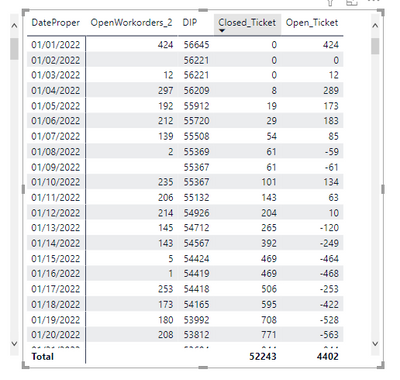
Secondly, the Open_Ticket doesnt appear to be a running total. Snip of the table:
I believe my issue here is this open measurement is giving us an "opened on this day" and therefore, the formula is simply [ Opened Tickets on Given Day - Total Closed Tickets in Period] which results in large negative figures. Can you help clarify on how to create the open measurements as a running total?
The issue appears to lie with filters. what change would need to be made for filters to work properly? If i added a filter slicer for, say, state order was made, how can i ensure the totals are including the filter.
The above snip was the result of me selecting a filtered field.
Vote for your favorite vizzies from the Power BI World Championship submissions!
If you love stickers, then you will definitely want to check out our Community Sticker Challenge!
Check out the January 2026 Power BI update to learn about new features.
| User | Count |
|---|---|
| 64 | |
| 56 | |
| 43 | |
| 20 | |
| 17 |
| User | Count |
|---|---|
| 123 | |
| 108 | |
| 44 | |
| 32 | |
| 24 |