Join us in Barcelona for FabCon and SQLCon, September 28 - October 1, 2026.
This is best Fabric, Power BI, SQL and AI community event. How do we know? The last event sold out! Save €200 with code FABCMTY200.
Register now- Power BI forums
- Get Help with Power BI
- Desktop
- Service
- Report Server
- Power Query
- Mobile Apps
- Developer
- DAX Commands and Tips
- Custom Visuals Development Discussion
- Health and Life Sciences
- Power BI Spanish forums
- Translated Spanish Desktop
- Training and Consulting
- Instructor Led Training
- Dashboard in a Day for Women, by Women
- Galleries
- Data Stories Gallery
- Themes Gallery
- Contests Gallery
- QuickViz Gallery
- Quick Measures Gallery
- Visual Calculations Gallery
- Fabric Apps Gallery
- Notebook Gallery
- Translytical Task Flow Gallery
- TMDL Gallery
- R Script Showcase
- Webinars and Video Gallery
- Ideas
- Custom Visuals Ideas (read-only)
- Issues
- Issues
- Events
- Upcoming Events
July 28 - August 9 | Final Round of the Power BI Dataviz World Championships. This is your chance. Learn more
- Power BI forums
- Forums
- Get Help with Power BI
- Desktop
- Re: Dynamic Conditional Formatting
- Subscribe to RSS Feed
- Mark Topic as New
- Mark Topic as Read
- Float this Topic for Current User
- Bookmark
- Subscribe
- Printer Friendly Page


- Mark as New
- Bookmark
- Subscribe
- Mute
- Subscribe to RSS Feed
- Permalink
- Report Inappropriate Content
Dynamic Conditional Formatting
I'm tring to add conditional colors to columns based on what's less than/greater than a dynamic parameter value. Any ideas on how to do it? Adding a column with dynamic values seemed promising, but I came up short on being able to implement it. TIA.
Solved! Go to Solution.


- Mark as New
- Bookmark
- Subscribe
- Mute
- Subscribe to RSS Feed
- Permalink
- Report Inappropriate Content
You can create a dynamic color measure. In place of static values, you can replace with value from the slicer
Color Date = if(FIRSTNONBLANK('Date'[date],TODAY()) <today(),"lightgreen","red")
Color sales = if(AVERAGE(Sales[Sales Amount])<170,"green","red")
Color Year = if(FIRSTNONBLANK('Date'[Year],2014) <=2016,"lightgreen",if(FIRSTNONBLANK('Date'[Year],2014)>2018,"red","yellow"))
Use fields option under conditional control and choose a measure like this. Refer :https://docs.microsoft.com/en-us/power-bi/desktop-conditional-table-formatting#color-by-color-values
- Mark as New
- Bookmark
- Subscribe
- Mute
- Subscribe to RSS Feed
- Permalink
- Report Inappropriate Content
You can create a dynamic color measure. In place of static values, you can replace with value from the slicer
Color Date = if(FIRSTNONBLANK('Date'[date],TODAY()) <today(),"lightgreen","red")
Color sales = if(AVERAGE(Sales[Sales Amount])<170,"green","red")
Color Year = if(FIRSTNONBLANK('Date'[Year],2014) <=2016,"lightgreen",if(FIRSTNONBLANK('Date'[Year],2014)>2018,"red","yellow"))
Use fields option under conditional control and choose a measure like this. Refer :https://docs.microsoft.com/en-us/power-bi/desktop-conditional-table-formatting#color-by-color-values
- Mark as New
- Bookmark
- Subscribe
- Mute
- Subscribe to RSS Feed
- Permalink
- Report Inappropriate Content
Worked perfectly. Thank you!
- Mark as New
- Bookmark
- Subscribe
- Mute
- Subscribe to RSS Feed
- Permalink
- Report Inappropriate Content
- Mark as New
- Bookmark
- Subscribe
- Mute
- Subscribe to RSS Feed
- Permalink
- Report Inappropriate Content
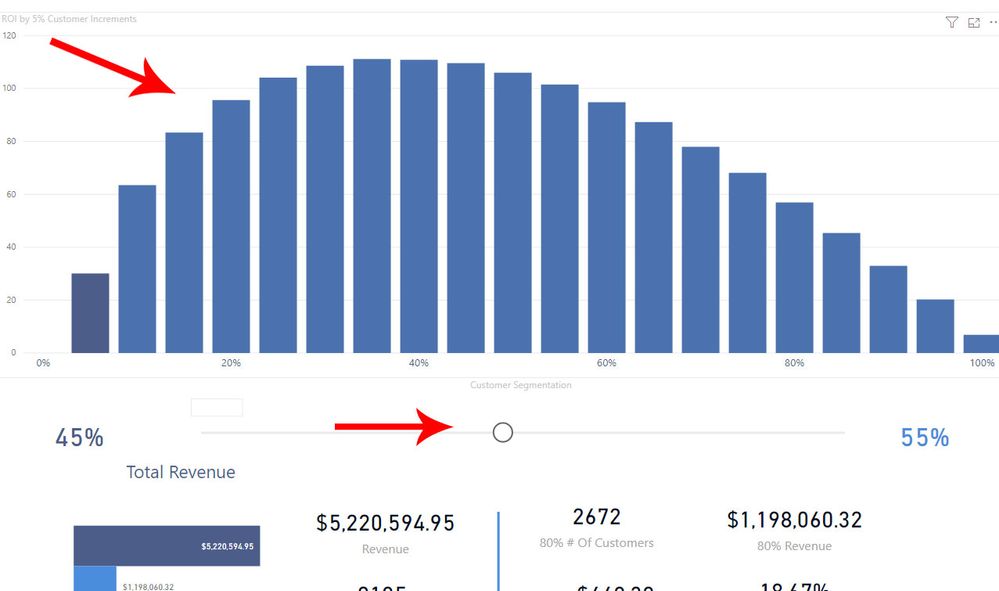
I feel like this is really close. What do I do with that measure in the context of needing to change the colors of the colums in this image based on the selection of the highlighted parameter?

- Mark as New
- Bookmark
- Subscribe
- Mute
- Subscribe to RSS Feed
- Permalink
- Report Inappropriate Content

- Mark as New
- Bookmark
- Subscribe
- Mute
- Subscribe to RSS Feed
- Permalink
- Report Inappropriate Content
Hi @czuniga ,
It will be really useful to have some form of screesnhots to your query or a .pbix file.
Currently, it's hard to understand and answer your question.
Thanks,
Pragati
- Mark as New
- Bookmark
- Subscribe
- Mute
- Subscribe to RSS Feed
- Permalink
- Report Inappropriate Content
Hi Pragati, thanks for the response. I'm trying to conditionally format the colors of the these columns based on the selectio of the highlighted parameter.


- Mark as New
- Bookmark
- Subscribe
- Mute
- Subscribe to RSS Feed
- Permalink
- Report Inappropriate Content
@czuniga You can actually create a measure that does this. I actually had to do the same thing based on a rolling average. Check the links below
https://docs.microsoft.com/en-us/power-bi/desktop-conditional-table-formatting
https://www.blue-granite.com/blog/controlling-conditional-formatting-using-dax

Helpful resources

FabCon & SQLCon – Barcelona 2026
Join us in Barcelona for FabCon and SQLCon, the Fabric, Power BI, SQL, and AI community event. Save €200 with code FABCMTY200.

Fabric Community Sticker Challenge - Barcelona 2026
If you love stickers, then you will definitely want to check out our community sticker challenge, Barcelona edition!

Power BI Monthly Update - July 2026
Check out the July 2026 Power BI update to learn about new features.

Power BI DataViz World Championships - June 2026
A new Power BI DataViz World Championship is coming this June! Don't miss out on submitting your entry.

| User | Count |
|---|---|
| 25 | |
| 23 | |
| 19 | |
| 17 | |
| 14 |


| User | Count |
|---|---|
| 24 | |
| 20 | |
| 20 | |
| 19 | |
| 19 |


