Content:
I'm facing a challenge with conditional formatting in a Power BI matrix. I need to color cells based on matching values from dynamic slicers controlling both rows and columns. The slicers use 'Field Parameters' to allow users to select different data fields for comparison.
Example: If a user selects Regio (eng: region) for both the row and column slicers and the cell intersects at 'Antwerpen' for both, the cell should turn green. But my DAX formula is comparing field names, not values, resulting in no matches.
How can I reference the actual data values in the slicers to dynamically apply conditional formatting?
You can see in the two card visuals its taking the name of the column but not the value of it.
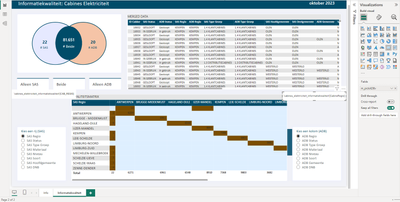
The measure:
```DAX
m_format_CabineNiveau =
IF( SELECTEDVALUE(SAS Visuals'[SAS Visuals Fields]) = SELECTEDVALUE(ADB Visuals'[MatrixVisual Fields]), "green", IF(AND(COUNT(table[ID]) > 0, SELECTEDVALUE(SAS Visuals'[SAS Visuals Fields]) <> SELECTEDVALUE(ADB Visuals'[MatrixVisual Fields])), "red", "light green" )
```
Normally, the diagonal of a matrix in Power BI should appear green if the row and column values match, as this indicates a match. When the row and column values are identical along the diagonal, such as 'Region A' in both the row and the column, those cells should be colored green to reflect the match.
Kind regards


