cancel
Showing results for 
Search instead for 
Did you mean: 

Join the FabCon + SQLCon recap series. Up next: Power BI, Real-Time Intelligence, IQ and AI, and Data Factory take center stage. All sessions are available on-demand after the live show. Register now

Reply
Smetje
New Member

Dynamic Conditional Formatting in Power BI Matrix Using Field Parameters

Content:

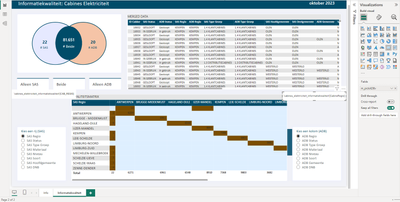
I'm facing a challenge with conditional formatting in a Power BI matrix. I need to color cells based on matching values from dynamic slicers controlling both rows and columns. The slicers use 'Field Parameters' to allow users to select different data fields for comparison.

Example: If a user selects Regio (eng: region) for both the row and column slicers and the cell intersects at 'Antwerpen' for both, the cell should turn green. But my DAX formula is comparing field names, not values, resulting in no matches.

How can I reference the actual data values in the slicers to dynamically apply conditional formatting?


You can see in the two card visuals its taking the name of the column but not the value of it.
Smetje_2-1701892357403.png


The measure:

```DAX

m_format_CabineNiveau =

IF( SELECTEDVALUE(SAS Visuals'[SAS Visuals Fields]) = SELECTEDVALUE(ADB Visuals'[MatrixVisual Fields]), "green", IF(AND(COUNT(table[ID]) > 0, SELECTEDVALUE(SAS Visuals'[SAS Visuals Fields]) <> SELECTEDVALUE(ADB Visuals'[MatrixVisual Fields])), "red", "light green" )

```


Normally, the diagonal of a matrix in Power BI should appear green if the row and column values match, as this indicates a match. When the row and column values are identical along the diagonal, such as 'Region A' in both the row and the column, those cells should be colored green to reflect the match.

Kind regards


1 REPLY 1
lbendlin
Super User
Super User

Please provide sample data that covers your issue or question completely, in a usable format (not as a screenshot).

Do not include sensitive information or anything not related to the issue or question.

If you are unsure how to upload data please refer to https://community.fabric.microsoft.com/t5/Community-Blog/How-to-provide-sample-data-in-the-Power-BI-...

Please show the expected outcome based on the sample data you provided.

Want faster answers? https://community.fabric.microsoft.com/t5/Desktop/How-to-Get-Your-Question-Answered-Quickly/m-p/1447...

Helpful resources

Announcements
April Power BI Update Carousel

Power BI Monthly Update - April 2026

Check out the April 2026 Power BI update to learn about new features.

New to Fabric survey Carousel

New to Fabric Survey

If you have recently started exploring Fabric, we'd love to hear how it's going. Your feedback can help with product improvements.

Power BI DataViz World Championships carousel

Power BI DataViz World Championships - June 2026

A new Power BI DataViz World Championship is coming this June! Don't miss out on submitting your entry.

FabCon and SQLCon Highlights Carousel

FabCon & SQLCon Highlights

Experience the highlights from FabCon & SQLCon, available live and on-demand starting April 14th.