Hi, I am trying to show based on a slider selection, a diferent measure and column in the same chart. To select a measure I have created a table _MeasureAct with the name of the slicers and then a measure with this:
ID ; Measure
1; Registered
2; Free
LineChart_Measure = var med =  min(_MeasureAct[Measure])
return
  switch(true();
    med = "Registered"; [UsersRegistered];
    med = "Free"; [UsersFree]
  )
As they use a different column, I have created another measure to get the corresponding column in axis:
Select Col =
var meas1 =  min(_MeasureAct[Measure])
return
  switch(true();
    meas1 = "Registered"; SELECTCOLUMNS(UseDevSesDay;"Semana";UseDevSesDay[DifWeekUse]);
    meas1 = "Free"; SELECTCOLUMNS(UseDevSesDayVid;"Semana";UseDevSesDayVid[DifWeekUse])
  )
When I drag to a visualization, it's not possible as it is returning a scalar value (isn't it?)
The problem is that, in the axis, they use a different column from a different table but are calculated in a similar way:
UseDevSesDayVid[DifWeekUse]) = datediff(related(DimTimeRegister[Week_StartDate]);related(DimTimeUse[Week_StartDate]);WEEK)
UseDevSesDay[DifWeekUse])= datediff(related(DimTimeRegister[Week_StartDate]);related(DimTimeUse[Week_StartDate]);WEEK)
and the measures:
Registered = calculate(DISTINCTCOUNT(UseDevSesDay[IdRegistered]); UseDevSesDay[IsRegistered])
Free = calculate(DISTINCTCOUNT(UseDevSesDayVid[IdRegistered]); UseDevSesDayVid[IsRegistered])
The key is, when I want to plot a the count of "Free" users, I use as measure Free and as column: UseDevSesDay[DifWeekUse]). Otherwise, if I want to plot the number of Registered Users I use "Registered" measure and UseDevSesDayVid[DifWeekUse]). The only think is that I don't want to draw two plots, instead I want to plot only one, but dynamically. In the other hand, I could do this with bookmarks, but is the last thing I want to do.
Is there any other way to return an entire column dynamically?
Another think, ¿is it possible to compare between those measures with one line chart or bar chart? Anyway, the X axis is the same "legend" (numberweek) but different measure.
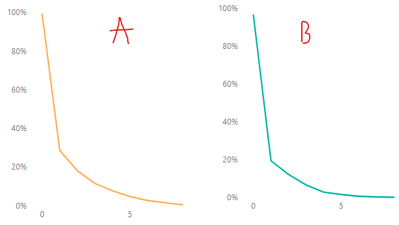
In "A" chart, I'm using UseDevSesDay[DifWeekUse]) as Axis and as values: Free
In "B" chart, I'm using UseDevSesDayVid[DifWeekUse]) as Axis and as values: Registered


