

cancel
Showing results for 
Search instead for 
Did you mean: 

Try your skills in the Power BI Dataviz World Championship! Round one ends June 26. Join now

Reply
Anonymous
Not applicable

Dynamic Column based on Slicer input

Hi there, 


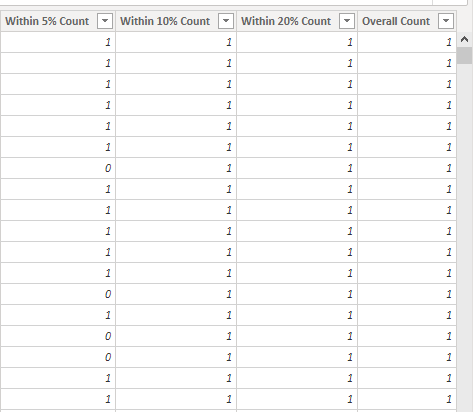
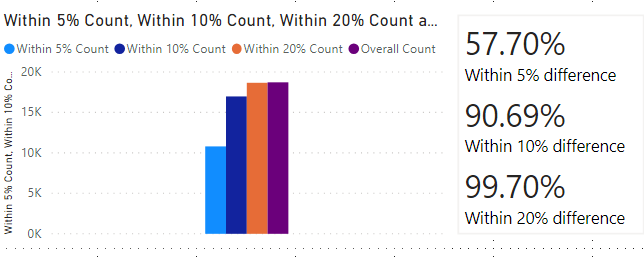
See the below pictures for context. I am currently using static columns to determine error in data. In Picture 1, you will see that I have 5%,10%, and 20% error columns which are calculated from a "% difference column". There is then an overall count which is a filter for negative data and error which should theoretically be inaccurate, so it places a 1 for every value where the % difference is >= 0. I am dividing the 5,10,20% columns by the overall count to determine the % accuracy over time, see Picture 2


I am looking to make Picture 3 a dynamic calculated column. I would like to use a slicer of 0-100, or some selected values as a variable and an input feature. While attempting to figure it out, I ran into problems using the selectedvalue command as a variable instead of the hardcoded value of 0.05,


Capture.PNG


capture2.PNGCapture1.PNGCapture3.PNG

1 REPLY 1
lc_finance
Solution Sage
Solution Sage

Hi @Anonymous ,


calculated columns cannot be dynamic based on a slicer. however, you can realize this using calculated measures


In a calculated measure, you can use SUMX to add up the 1 and 0 that you calculate in each row. I recently made a blog post on using SUMX inside a calculated measure, you can find it here:

https://finance-bi.com/power-bi-totals-incorrect/

It's a different context than yours, but it might help you.


Let me know if you need any additional help. In that case, please share your Power BI file using One Drive, Google Drive or similar tool and I can take a look.


Regards


LC

Interested in Power BI and DAX templates? Check out my blog at www.finance-bi.com

Helpful resources

Announcements
Fabric Data Days is here Carousel

Fabric Data Days 2026

Don't miss out on Data Days, June 15 through August 7. Learn Fabric, Power BI, SQL, AI and more.

May Power BI Update Carousel

Power BI Monthly Update - May 2026

Check out the May 2026 Power BI update to learn about new features.

Power BI DataViz World Championships carousel

Power BI DataViz World Championships - June 2026

A new Power BI DataViz World Championship is coming this June! Don't miss out on submitting your entry.