cancel
Showing results for 
Search instead for 
Did you mean: 

Learn from the best! Meet the four finalists headed to the FINALS of the Power BI Dataviz World Championships! Register now

Reply
MWilson929
Frequent Visitor

Dynamic Column References

Hi,


I have a few matrix reports in my pbix file. On is on Values;


CY Value, LY Value, % Change


Another is on units;


CY Units, LY Units, % Change


I can calculate the % Change for values as;


% Change = (Sales[CY Value] - Sales[LY Value]) / Sales[LY Value]


The only way I know to create a % Change for Units is to create another % Change measure. Is there a more efficient way of doing this in DAX so there is only one percentage change measure? I'm thinking along the lines of;


% Change = (Sales[Column 1] - Sales[Column 2]) / Sales[Column 2]


Relatively new to DAX, so if anyone can advise me on best practice, that would be amazing.


Many Thanks,


Mark

1 ACCEPTED SOLUTION
prateekraina
Memorable Member
Memorable Member

You can use the "Invoke Cutsom Function" feature of Power BI Query Editor to create a function to handle this calculation.

Refer Chris Webb's blog for more details.


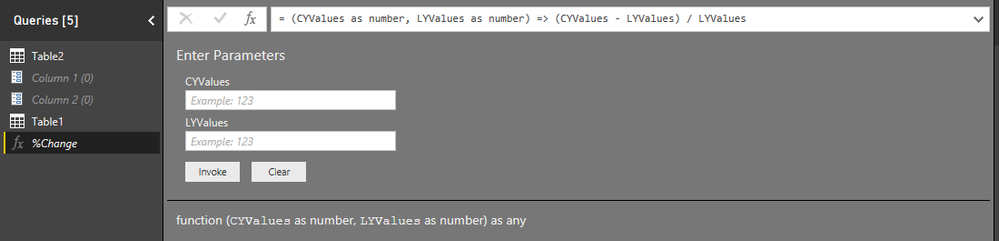
Edit 2: Ignore Column 1 and Column 2 Parameters in the image, those have nothing to do with the solution.


Edit 1: I have tried your scenario and was able to create a function as suggested in the blog. It would look like this:
Step 1: Create function using blank query optionStep 1: Create function using blank query optionStep 2: Select Invoke Custom function in your table and configure to get resultStep 2: Select Invoke Custom function in your table and configure to get result

View solution in original post

1 REPLY 1
prateekraina
Memorable Member
Memorable Member

You can use the "Invoke Cutsom Function" feature of Power BI Query Editor to create a function to handle this calculation.

Refer Chris Webb's blog for more details.


Edit 2: Ignore Column 1 and Column 2 Parameters in the image, those have nothing to do with the solution.


Edit 1: I have tried your scenario and was able to create a function as suggested in the blog. It would look like this:
Step 1: Create function using blank query optionStep 1: Create function using blank query optionStep 2: Select Invoke Custom function in your table and configure to get resultStep 2: Select Invoke Custom function in your table and configure to get result

Helpful resources

Announcements
Join our Fabric User Panel

Join our Fabric User Panel

Share feedback directly with Fabric product managers, participate in targeted research studies and influence the Fabric roadmap.

March Power BI Update Carousel

Power BI Community Update - March 2026

Check out the March 2026 Power BI update to learn about new features.