This is best Fabric, Power BI, SQL and AI community event. How do we know? The last event sold out! Save €200 with code FABCMTY200.
Register nowA new Data Days event is coming soon! This time we’re going bigger than ever. Fabric, Power BI, SQL, AI and more. Don't miss out.
Hi,
I have a few matrix reports in my pbix file. On is on Values;
CY Value, LY Value, % Change
Another is on units;
CY Units, LY Units, % Change
I can calculate the % Change for values as;
% Change = (Sales[CY Value] - Sales[LY Value]) / Sales[LY Value]
The only way I know to create a % Change for Units is to create another % Change measure. Is there a more efficient way of doing this in DAX so there is only one percentage change measure? I'm thinking along the lines of;
% Change = (Sales[Column 1] - Sales[Column 2]) / Sales[Column 2]
Relatively new to DAX, so if anyone can advise me on best practice, that would be amazing.
Many Thanks,
Mark
Solved! Go to Solution.
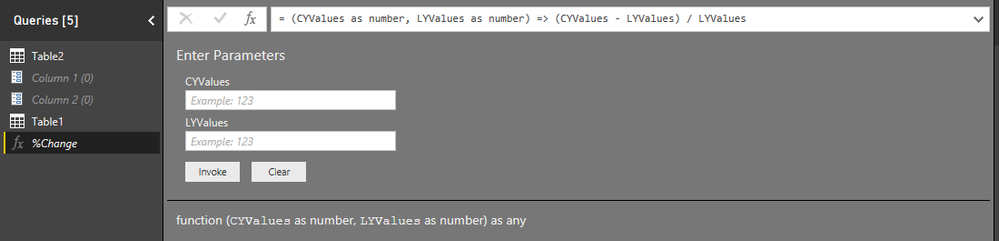
You can use the "Invoke Cutsom Function" feature of Power BI Query Editor to create a function to handle this calculation.
Refer Chris Webb's blog for more details.
Edit 2: Ignore Column 1 and Column 2 Parameters in the image, those have nothing to do with the solution.
Edit 1: I have tried your scenario and was able to create a function as suggested in the blog. It would look like this:Step 1: Create function using blank query option
Step 2: Select Invoke Custom function in your table and configure to get result
You can use the "Invoke Cutsom Function" feature of Power BI Query Editor to create a function to handle this calculation.
Refer Chris Webb's blog for more details.
Edit 2: Ignore Column 1 and Column 2 Parameters in the image, those have nothing to do with the solution.
Edit 1: I have tried your scenario and was able to create a function as suggested in the blog. It would look like this:Step 1: Create function using blank query option
Step 2: Select Invoke Custom function in your table and configure to get result
Check out the May 2026 Power BI update to learn about new features.
Sign up to receive a private message when registration opens and key events begin.
If you have recently started exploring Fabric, we'd love to hear how it's going. Your feedback can help with product improvements.
| User | Count |
|---|---|
| 27 | |
| 26 | |
| 22 | |
| 19 | |
| 17 |
| User | Count |
|---|---|
| 45 | |
| 42 | |
| 41 | |
| 21 | |
| 18 |