cancel
Showing results for 
Search instead for 
Did you mean: 

Join the FabCon + SQLCon recap series. Up next: Power BI, Real-Time Intelligence, IQ and AI, and Data Factory take center stage. All sessions are available on-demand after the live show. Register now

Reply
gtrthang
New Member

Dynamic Column Header Names based month

I have a SQL data source that has relationships activities that will happen for various months.  The data source has a separate column for the previous 11 months, current month, and 23 future months (see example below), simular to a matrix.  Instead of displaying "Current Month" or "Current Month -1" I'd like to display the actual month/year as column headers in a table.  Any suggestions?  I could create a line in the data source to include the month's name, but not sure if that could be used.


gtrthang_0-1621276218169.png


Note:  I have used a reformated data source and have displayed as a Matrix.  The issue is I have about 30 columns that have to be displayed with the month information, so the lack of scrolling of the non-summarized fields presents an issue for the Matrix.


Thank you

1 ACCEPTED SOLUTION
MFelix
Super User
Super User

Hi @gtrthang ,


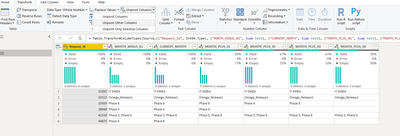
On the query Editor select the RequestID column and unpivot other columns:

MFelix_0-1621422178234.png

Now add the following column:


if [Attribute] = "CURRENT_MONTH" then
  Date.StartOfMonth(DateTime.LocalNow())
else if Text.Contains([Attribute], "MINUS") then
  Date.StartOfMonth(Date.AddMonths(DateTime.LocalNow(), - 1))
else
  Date.StartOfMonth(Date.AddMonths(DateTime.LocalNow(), Number.FromText(Text.End([Attribute], 2))))


Now you can use the column in your visualizations.


See PBIX file attach.


Regards

Miguel Félix


Did I answer your question? Mark my post as a solution!

Proud to be a Super User!

Check out my blog: Power BI em Português


View solution in original post

1 REPLY 1
MFelix
Super User
Super User

Hi @gtrthang ,


On the query Editor select the RequestID column and unpivot other columns:

MFelix_0-1621422178234.png

Now add the following column:


if [Attribute] = "CURRENT_MONTH" then
  Date.StartOfMonth(DateTime.LocalNow())
else if Text.Contains([Attribute], "MINUS") then
  Date.StartOfMonth(Date.AddMonths(DateTime.LocalNow(), - 1))
else
  Date.StartOfMonth(Date.AddMonths(DateTime.LocalNow(), Number.FromText(Text.End([Attribute], 2))))


Now you can use the column in your visualizations.


See PBIX file attach.


Regards

Miguel Félix


Did I answer your question? Mark my post as a solution!

Proud to be a Super User!

Check out my blog: Power BI em Português


Helpful resources

Announcements
April Power BI Update Carousel

Power BI Monthly Update - April 2026

Check out the April 2026 Power BI update to learn about new features.

New to Fabric survey Carousel

New to Fabric Survey

If you have recently started exploring Fabric, we'd love to hear how it's going. Your feedback can help with product improvements.

Power BI DataViz World Championships carousel

Power BI DataViz World Championships - June 2026

A new Power BI DataViz World Championship is coming this June! Don't miss out on submitting your entry.

FabCon and SQLCon Highlights Carousel

FabCon &SQLCon Highlights

Experience the highlights from FabCon & SQLCon, available live and on-demand starting April 14th.