Don't miss your chance to take the Fabric Data Engineer (DP-700) exam on us!
Learn moreWe've captured the moments from FabCon & SQLCon that everyone is talking about, and we are bringing them to the community, live and on-demand. Starts on April 14th. Register now
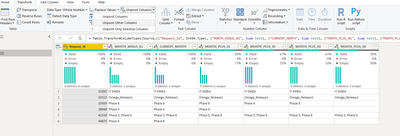
I have a SQL data source that has relationships activities that will happen for various months. The data source has a separate column for the previous 11 months, current month, and 23 future months (see example below), simular to a matrix. Instead of displaying "Current Month" or "Current Month -1" I'd like to display the actual month/year as column headers in a table. Any suggestions? I could create a line in the data source to include the month's name, but not sure if that could be used.
Note: I have used a reformated data source and have displayed as a Matrix. The issue is I have about 30 columns that have to be displayed with the month information, so the lack of scrolling of the non-summarized fields presents an issue for the Matrix.
Thank you
Solved! Go to Solution.
Hi @gtrthang ,
On the query Editor select the RequestID column and unpivot other columns:
Now add the following column:
if [Attribute] = "CURRENT_MONTH" then
Date.StartOfMonth(DateTime.LocalNow())
else if Text.Contains([Attribute], "MINUS") then
Date.StartOfMonth(Date.AddMonths(DateTime.LocalNow(), - 1))
else
Date.StartOfMonth(Date.AddMonths(DateTime.LocalNow(), Number.FromText(Text.End([Attribute], 2))))
Now you can use the column in your visualizations.
See PBIX file attach.
Regards
Miguel Félix
Proud to be a Super User!
Check out my blog: Power BI em PortuguêsHi @gtrthang ,
On the query Editor select the RequestID column and unpivot other columns:
Now add the following column:
if [Attribute] = "CURRENT_MONTH" then
Date.StartOfMonth(DateTime.LocalNow())
else if Text.Contains([Attribute], "MINUS") then
Date.StartOfMonth(Date.AddMonths(DateTime.LocalNow(), - 1))
else
Date.StartOfMonth(Date.AddMonths(DateTime.LocalNow(), Number.FromText(Text.End([Attribute], 2))))
Now you can use the column in your visualizations.
See PBIX file attach.
Regards
Miguel Félix
Proud to be a Super User!
Check out my blog: Power BI em PortuguêsIf you have recently started exploring Fabric, we'd love to hear how it's going. Your feedback can help with product improvements.
A new Power BI DataViz World Championship is coming this June! Don't miss out on submitting your entry.
Share feedback directly with Fabric product managers, participate in targeted research studies and influence the Fabric roadmap.
| User | Count |
|---|---|
| 51 | |
| 37 | |
| 35 | |
| 19 | |
| 17 |
| User | Count |
|---|---|
| 72 | |
| 70 | |
| 39 | |
| 34 | |
| 23 |