cancel
Showing results for 
Search instead for 
Did you mean: 

View all the Fabric Data Days sessions on demand. View schedule

Reply
karma
Advocate II
Advocate II

Dynamic Card Visual's Color

Is it possible to change the background colour of a card visual dynamically based upon the measure/column that we are using in the card?
 
Eg- if the value is below 10 i want to display Red colour
If it is 20 then green etc
1 ACCEPTED SOLUTION
truptis
Community Champion
Community Champion

Hi @karma ,

Yes, it can be achieved using conditional formatting of the visual.

Please try the below steps:
1) Click on your card visual and go to your format options
2) In format, click on background colour
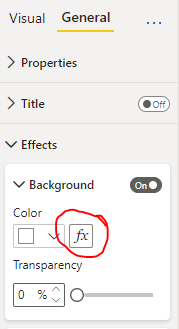
turn the toggle on and click on fx (refer screenshot below)
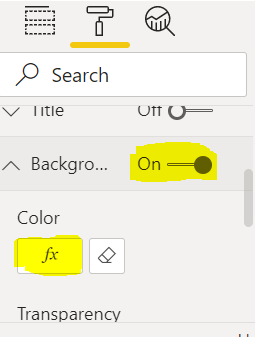
truptis_3-1647509468819.png


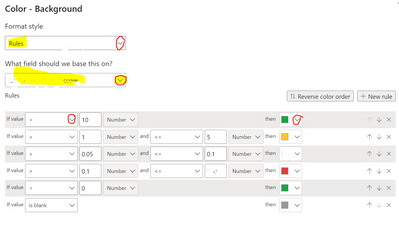
3)After clicking on fx, a window would pop up:
in format style- Select Rule
what field should we base it on? - Select your measure/calculation
In rules give your conditions:
eg- if value > 10 then select your desired colour(Refer screenshot below):
truptis_4-1647509502582.png


Then click on OK.

@karma  if this helps you then please mark it as a solution & hit the thumbs up. Thank you.


View solution in original post

3 REPLIES 3
truptis
Community Champion
Community Champion

Hi @karma ,

Yes, it can be achieved using conditional formatting of the visual.

Please try the below steps:
1) Click on your card visual and go to your format options
2) In format, click on background colour
turn the toggle on and click on fx (refer screenshot below)

truptis_3-1647509468819.png


3)After clicking on fx, a window would pop up:
in format style- Select Rule
what field should we base it on? - Select your measure/calculation
In rules give your conditions:
eg- if value > 10 then select your desired colour(Refer screenshot below):

truptis_4-1647509502582.png


Then click on OK.

@karma  if this helps you then please mark it as a solution & hit the thumbs up. Thank you.


Thank you @truptis 

That worked just as required.


Thanks for the detailed reply. Cheers!!!

coskuersanli
Resolver III
Resolver III

Hi @karma 

You can use conditional formating 🙂

coskuersanli_0-1647509495199.png


Helpful resources

Announcements
November Power BI Update Carousel

Power BI Monthly Update - November 2025

Check out the November 2025 Power BI update to learn about new features.

Fabric Data Days Carousel

Fabric Data Days

Advance your Data & AI career with 50 days of live learning, contests, hands-on challenges, study groups & certifications and more!

FabCon Atlanta 2026 carousel

FabCon Atlanta 2026

Join us at FabCon Atlanta, March 16-20, for the ultimate Fabric, Power BI, AI and SQL community-led event. Save $200 with code FABCOMM.

Top Solution Authors
Top Kudoed Authors