cancel
Showing results for 
Search instead for 
Did you mean: 

The Power BI Data Visualization World Championships is back! Get ahead of the game and start preparing now! Learn more

Reply
tahechadv_2022
Helper II
Helper II

Dynamic Bar Color

Hi guys!


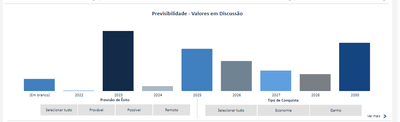
In the following chart, it shows a graph and two filters. "Previsão de Êxito" and "Tipo de Conquista"

tahechadv_2022_0-1665430583329.png

I want to change the color of the bars in the chart according to the "Tipo de Conquista" filter.

Example:

When I click over "Economia" it would change to RED, and if I click over "Ganho" it would change to GRAY. (or any other column)

(All bars should change its colors to a single color)


*The Y-axis ("Economia" and "Ganho") are measures


Is it possible?

1 ACCEPTED SOLUTION
dcrosseto
Resolver II
Resolver II

Hi @tahechadv_2022 ,


You can use the SELECTEDVALUE function pointing to the filter and then based on the result, you choose a color, something like this


var filter_selected = SELECTEDVALUE('column used on the slicer')

return

SWITCH(

     TRUE(),

     filter_selected = "Economia", "Red",

     filter_selected = "Ganho", "Gray",

     "#FFFFFF" -- you can also use hex code

)


After creating this measure, you apply a Field Value to the colors, on the path below


https://prnt.sc/1wBO_R8f3UsN


Hope it helps,


Regards,

Douglas.

View solution in original post

5 REPLIES 5
dcrosseto
Resolver II
Resolver II

Hi @tahechadv_2022 ,


You can use the SELECTEDVALUE function pointing to the filter and then based on the result, you choose a color, something like this


var filter_selected = SELECTEDVALUE('column used on the slicer')

return

SWITCH(

     TRUE(),

     filter_selected = "Economia", "Red",

     filter_selected = "Ganho", "Gray",

     "#FFFFFF" -- you can also use hex code

)


After creating this measure, you apply a Field Value to the colors, on the path below


https://prnt.sc/1wBO_R8f3UsN


Hope it helps,


Regards,

Douglas.

Thank-you!


It worked out, for "Economia" and "Ganho"... but


When I click over "Selecionar tudo" (Select all, in english) it returns two colors different colors:

tahechadv_2022_0-1665499944412.png

How can I set a specific colors to "Selecionar tudo" (Select all, in english)?

I just solved the problem

var filter_selected = SELECTEDVALUE(cad_processo[Ganho/Perda])

return
SWITCH(
     TRUE(),
     filter_selected = "Economia", "#4180c0",
     filter_selected = "Ganho", "#162c48",
     filter_selected = "", "#162c48",
     "4180c0"
)

Boa!! 😄


You can also use the function ISFILTERED, it returns True or False regarding of the slicer selection.


Abraços,

Douglas.


I didn't understand your logic, can you give me an example?

Helpful resources

Announcements
Power BI DataViz World Championships

Power BI Dataviz World Championships

The Power BI Data Visualization World Championships is back! Get ahead of the game and start preparing now!

December 2025 Power BI Update Carousel

Power BI Monthly Update - December 2025

Check out the December 2025 Power BI Holiday Recap!

FabCon Atlanta 2026 carousel

FabCon Atlanta 2026

Join us at FabCon Atlanta, March 16-20, for the ultimate Fabric, Power BI, AI and SQL community-led event. Save $200 with code FABCOMM.

Top Solution Authors