Join us at FabCon Atlanta from March 16 - 20, 2026, for the ultimate Fabric, Power BI, AI and SQL community-led event. Save $200 with code FABCOMM.
Register now!Vote for your favorite vizzies from the Power BI Dataviz World Championship submissions. Vote now!
Hi,
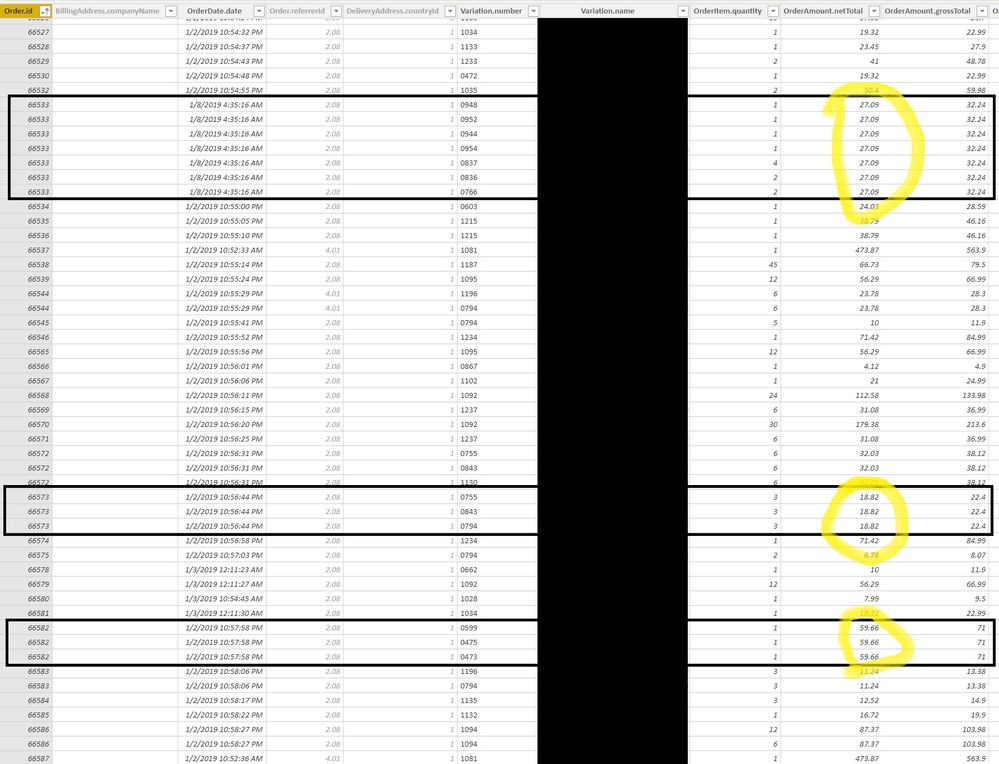
ERP returns me a sales dataset that for each item in the order returns a row in a dataset, which specifies quantity, id and the rest... however this row also contains the total order value. So whenever I have an order with multiple items I get the rows populated with multiple duplicates of order totals. And therefore the sales report is insanely distorted.
I am a novice in Power Pivot and my only way to solve this would be to create a duplicate dataset, which deletes all duplicates on the basis of OrderId and from there use the order total.
But I think the more elegant solution would be with measures, however I do not know how to write it. Can any of you help me with this?
The sample screenshot of the data is below:
Thanks!
Andraz
Solved! Go to Solution.
I guess I'm going to solve it for myself 🙂
MaxOrderAmount = MAX('Sharepoint-RAW-data-link'[OrderAmount.grossTotal])
GrossTotalOrderAmountD = SUMX(DISTINCT('Sharepoint-RAW-data-link'[Order.id]),[MaxOrderAmount])
I guess I'm going to solve it for myself 🙂
MaxOrderAmount = MAX('Sharepoint-RAW-data-link'[OrderAmount.grossTotal])
GrossTotalOrderAmountD = SUMX(DISTINCT('Sharepoint-RAW-data-link'[Order.id]),[MaxOrderAmount])
Vote for your favorite vizzies from the Power BI World Championship submissions!
If you love stickers, then you will definitely want to check out our Community Sticker Challenge!
Check out the January 2026 Power BI update to learn about new features.
| User | Count |
|---|---|
| 66 | |
| 51 | |
| 42 | |
| 25 | |
| 22 |
| User | Count |
|---|---|
| 140 | |
| 116 | |
| 56 | |
| 37 | |
| 31 |