Get certified for free when you join Fabric Data Days 2026 and dive into Fabric, Power BI, SQL, AI, and other essential data skills.
Join nowTry your skills in the Power BI Dataviz World Championship! Round one ends June 26. Join now
Hello PBI Gurus,
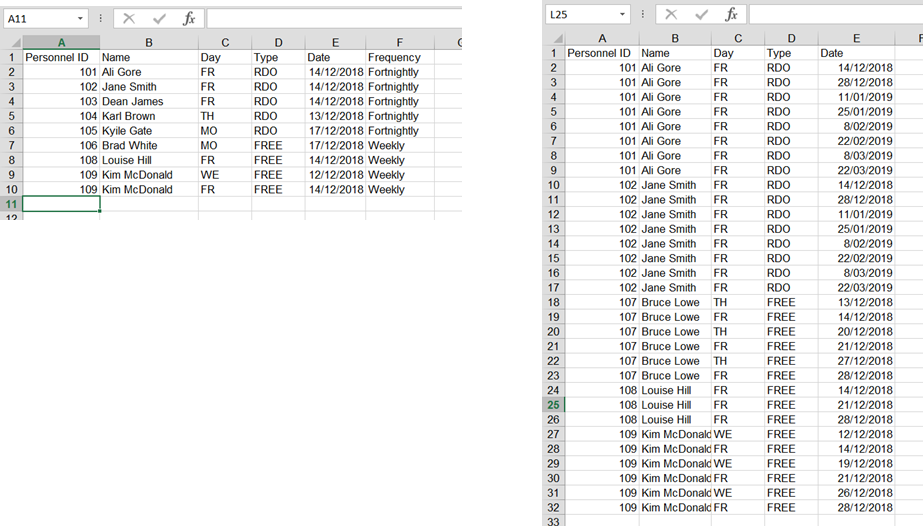
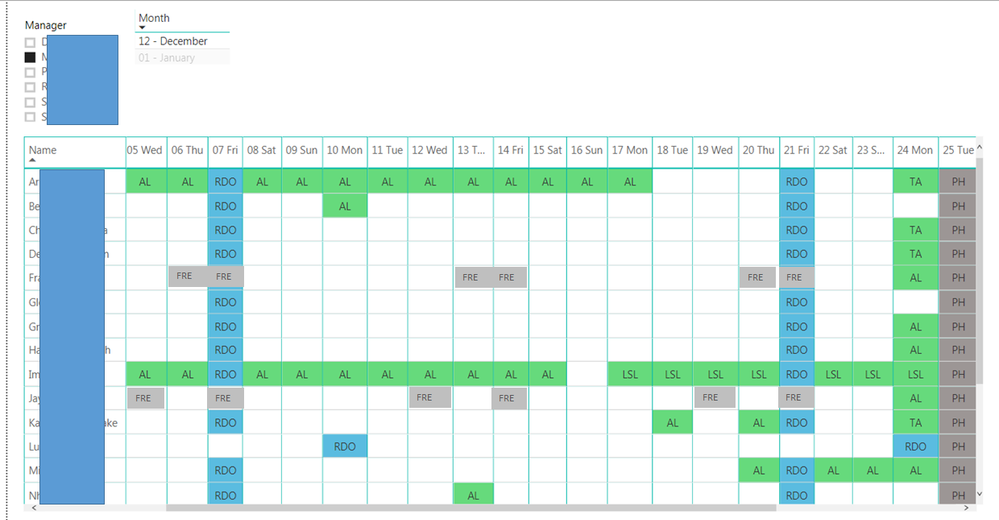
I am after your assistance with a query that can duplicate rows based on date & frequency of occurance to generate a work schedule calendar, where an employee has different schedules, eg work a 9 day fortnight, part time Mon to Thur, Weekends, etc.
Data contained in first excel sheet from a single row to duplicate the row at each date occurance, with the end result a visual calendar of employee availability
https://drive.google.com/open?id=162619nHpiwsW6IytsnLhs0mbzNl-hmOH
Appreciate any assistance with this one as with my initial calendar, I entred RDO frequency manually for a small hanful of employees and is not viable for the scale of data I have for 1500 employees and frequency of schedules to change.
Solved! Go to Solution.
I managed to figure it out (there maybe a better way of doing it thou).......
I added an Index column against each individual entry and then added a new column:
=List.Dates(Date.AddDays([EventDate],[#"Frequencey"]),[Occurance],Duration.From(#"Frequency"]))
And it worked
I managed to figure it out (there maybe a better way of doing it thou).......
I added an Index column against each individual entry and then added a new column:
=List.Dates(Date.AddDays([EventDate],[#"Frequencey"]),[Occurance],Duration.From(#"Frequency"]))
And it worked
| User | Count |
|---|---|
| 23 | |
| 21 | |
| 20 | |
| 17 | |
| 11 |
| User | Count |
|---|---|
| 55 | |
| 53 | |
| 41 | |
| 36 | |
| 32 |