Get certified for free when you join Fabric Data Days 2026 and dive into Fabric, Power BI, SQL, AI, and other essential data skills.
Join nowJuly 7 - July 17 | Round 2 of the Power BI Dataviz World Championships. Don't miss your chance! Learn more
Hello PBI Gurus,
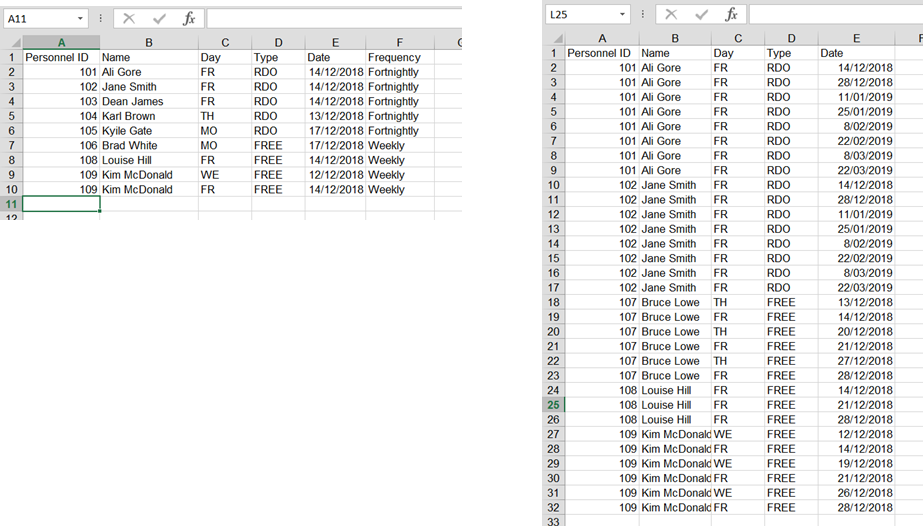
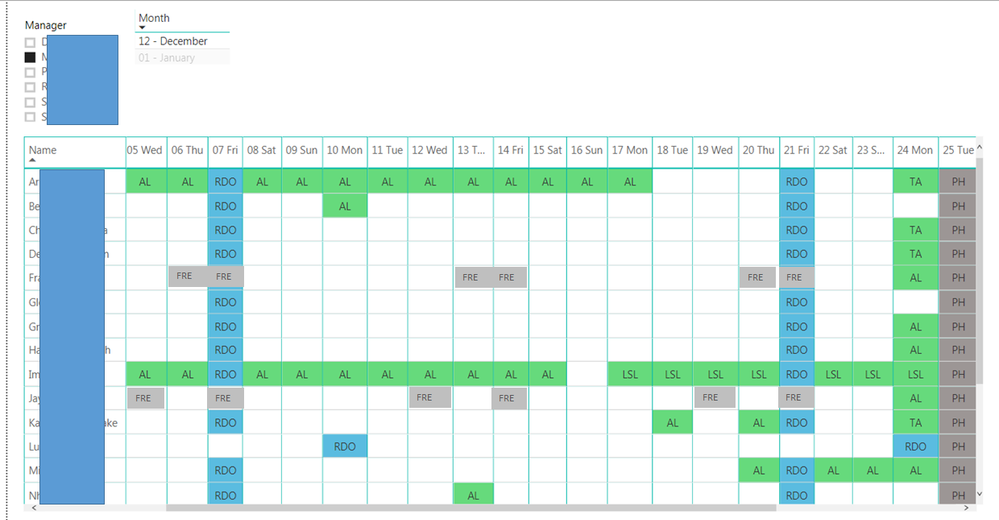
I am after your assistance with a query that can duplicate rows based on date & frequency of occurance to generate a work schedule calendar, where an employee has different schedules, eg work a 9 day fortnight, part time Mon to Thur, Weekends, etc.
Data contained in first excel sheet from a single row to duplicate the row at each date occurance, with the end result a visual calendar of employee availability
https://drive.google.com/open?id=162619nHpiwsW6IytsnLhs0mbzNl-hmOH
Appreciate any assistance with this one as with my initial calendar, I entred RDO frequency manually for a small hanful of employees and is not viable for the scale of data I have for 1500 employees and frequency of schedules to change.
Solved! Go to Solution.
I managed to figure it out (there maybe a better way of doing it thou).......
I added an Index column against each individual entry and then added a new column:
=List.Dates(Date.AddDays([EventDate],[#"Frequencey"]),[Occurance],Duration.From(#"Frequency"]))
And it worked
I managed to figure it out (there maybe a better way of doing it thou).......
I added an Index column against each individual entry and then added a new column:
=List.Dates(Date.AddDays([EventDate],[#"Frequencey"]),[Occurance],Duration.From(#"Frequency"]))
And it worked
Join us in Barcelona for FabCon and SQLCon, the Fabric, Power BI, SQL, and AI community event. Save €200 with code FABCMTY200.
Join Fabric Data Days 2026: 60 days of free live/on-demand sessions, challenges, study groups, and certification opportunities.
| User | Count |
|---|---|
| 22 | |
| 22 | |
| 18 | |
| 16 | |
| 13 |
| User | Count |
|---|---|
| 63 | |
| 41 | |
| 40 | |
| 39 | |
| 38 |