Join us in Barcelona for FabCon and SQLCon, September 28 - October 1, 2026.
This is best Fabric, Power BI, SQL and AI community event. How do we know? The last event sold out! Save €200 with code FABCMTY200.
Register now- Power BI forums
- Get Help with Power BI
- Desktop
- Service
- Report Server
- Power Query
- Mobile Apps
- Developer
- DAX Commands and Tips
- Custom Visuals Development Discussion
- Health and Life Sciences
- Power BI Spanish forums
- Translated Spanish Desktop
- Training and Consulting
- Instructor Led Training
- Dashboard in a Day for Women, by Women
- Galleries
- Data Stories Gallery
- Themes Gallery
- Contests Gallery
- QuickViz Gallery
- Quick Measures Gallery
- Visual Calculations Gallery
- Fabric Apps Gallery
- Notebook Gallery
- Translytical Task Flow Gallery
- TMDL Gallery
- R Script Showcase
- Webinars and Video Gallery
- Ideas
- Custom Visuals Ideas (read-only)
- Issues
- Issues
- Events
- Upcoming Events
The Fabric community is now in read-only for platform upgrade. Learn more
- Power BI forums
- Forums
- Get Help with Power BI
- Desktop
- Re: Duplicate Ranks
- Subscribe to RSS Feed
- Mark Topic as New
- Mark Topic as Read
- Float this Topic for Current User
- Bookmark
- Subscribe
- Printer Friendly Page

- Mark as New
- Bookmark
- Subscribe
- Mute
- Subscribe to RSS Feed
- Permalink
Duplicate Ranks
Hi Please find the sample pbix file and Expected output. Here i want to show Top 50 providers on rank wise while sorting the paid amount. Here am using table visual with diffrent dimenssons and Facts.
Note: Here my orginal source is tabular model so i can't create index column so we need to apply dax to show ranks top 50 records(like need to add incremental column) , i have already filtered out Top 50 records just i want show one column for Ranks.
ADDCOLUMNS(test, "Rank", countrows(FILTER (TEST,[Paid_Amount]>=EARLIER([PAID_AMOUNT]) )
Solved! Go to Solution.
- Mark as New
- Bookmark
- Subscribe
- Mute
- Subscribe to RSS Feed
- Permalink
Hi Harsh Thanks for giving reply, Iam using same query which you sent but Still it's displaying duplicates ranks. I undestand might be you are using Network Licence[ Network Licence key] column but orginal report i amNot using any key column, and it should be Network Licence[Network Licence Number]. While am using this column am getting error. Please suggest me how Can i get the Ranks.
- Mark as New
- Bookmark
- Subscribe
- Mute
- Subscribe to RSS Feed
- Permalink
Hi @Narayana3635 ,
https://drive.google.com/file/d/1Ys6MLP74cF_L_16i3lPFSe5CZDubZX6g/view?usp=sharing
Regards,
Harsh Nathani
Did I answer your question? Mark my post as a solution! Appreciate with a Kudos!! (Click the Thumbs Up Button)
- Mark as New
- Bookmark
- Subscribe
- Mute
- Subscribe to RSS Feed
- Permalink
Hi @Anonymous ,
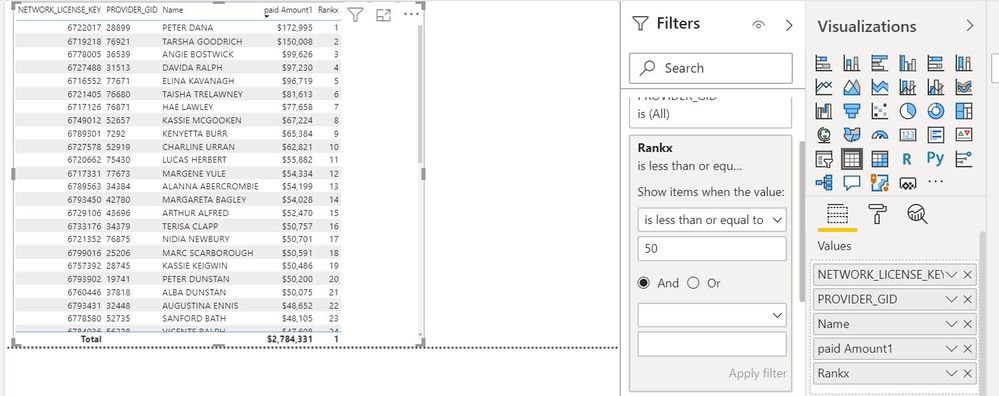
Create the below measures.
Regards,
Harsh Nathani
Did I answer your question? Mark my post as a solution! Appreciate with a Kudos!! (Click the Thumbs Up Button)
- Mark as New
- Bookmark
- Subscribe
- Mute
- Subscribe to RSS Feed
- Permalink
Hi Harsh Thanks for giving reply, Iam using same query which you sent but Still it's displaying duplicates ranks. I undestand might be you are using Network Licence[ Network Licence key] column but orginal report i amNot using any key column, and it should be Network Licence[Network Licence Number]. While am using this column am getting error. Please suggest me how Can i get the Ranks.
- Mark as New
- Bookmark
- Subscribe
- Mute
- Subscribe to RSS Feed
- Permalink
Hi @Anonymous ,
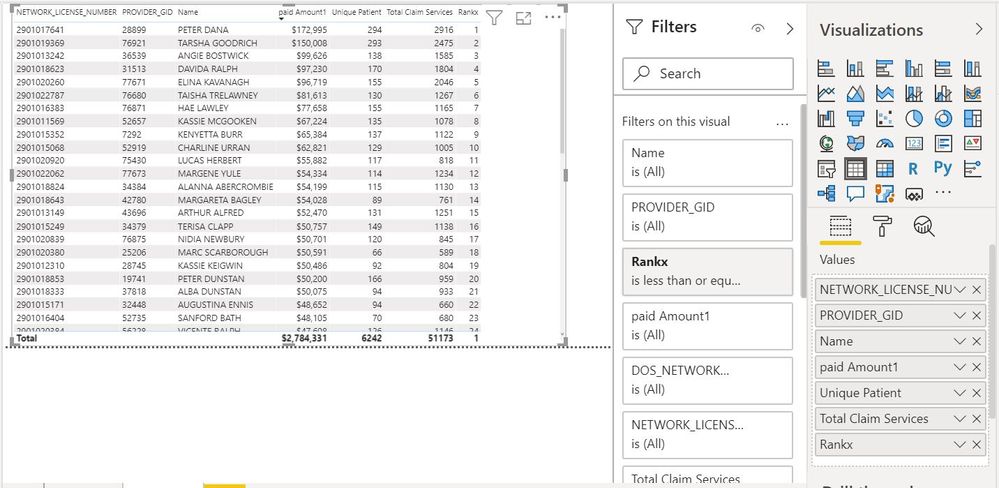
Regards,
Harsh Nathani
Did I answer your question? Mark my post as a solution! Appreciate with a Kudos!! (Click the Thumbs Up Button)
- Mark as New
- Bookmark
- Subscribe
- Mute
- Subscribe to RSS Feed
- Permalink
Hi @Anonymous ,
https://drive.google.com/file/d/1Ys6MLP74cF_L_16i3lPFSe5CZDubZX6g/view?usp=sharing
Regards,
Harsh Nathani
Did I answer your question? Mark my post as a solution! Appreciate with a Kudos!! (Click the Thumbs Up Button)
- Mark as New
- Bookmark
- Subscribe
- Mute
- Subscribe to RSS Feed
- Permalink
Hi Harshat, This is working fine but when we have parameter selection the data is not filtered can you please help me.
- Mark as New
- Bookmark
- Subscribe
- Mute
- Subscribe to RSS Feed
- Permalink
@Anonymous ,
What parameter are you selecting ?
Regards,
HN
- Mark as New
- Bookmark
- Subscribe
- Mute
- Subscribe to RSS Feed
- Permalink
Hi @Narayana3635 ,
https://drive.google.com/file/d/1Ys6MLP74cF_L_16i3lPFSe5CZDubZX6g/view?usp=sharing
Regards,
Harsh Nathani
Did I answer your question? Mark my post as a solution! Appreciate with a Kudos!! (Click the Thumbs Up Button)
- Mark as New
- Bookmark
- Subscribe
- Mute
- Subscribe to RSS Feed
- Permalink
Thnka Harsh, You Made by day. It's time to kudos to you.


- Mark as New
- Bookmark
- Subscribe
- Mute
- Subscribe to RSS Feed
- Permalink
Hi @Anonymous
I don't like your SUMMARIZE() statement https://docs.microsoft.com/en-us/dax/summarize-function-dax
it has to contains of "name" argument, I don't see it on the screenshot


- Mark as New
- Bookmark
- Subscribe
- Mute
- Subscribe to RSS Feed
- Permalink
@Anonymous ,
For Rank Refer these links
https://radacad.com/how-to-use-rankx-in-dax-part-2-of-3-calculated-measures
https://radacad.com/how-to-use-rankx-in-dax-part-1-of-3-calculated-columns
https://radacad.com/how-to-use-rankx-in-dax-part-3-of-3-the-finale
https://community.powerbi.com/t5/Community-Blog/Dynamic-TopN-made-easy-with-What-If-Parameter/ba-p/3...
- Mark as New
- Bookmark
- Subscribe
- Mute
- Subscribe to RSS Feed
- Permalink
Hi amit, I gone through the links still i didn't find the my exact solution. If you are able to help me please find the sample data and expected output on my orginal post.
- Mark as New
- Bookmark
- Subscribe
- Mute
- Subscribe to RSS Feed
- Permalink
Hi @Anonymous
try a measure
Measure rankx =
RANKX(
ALL('Fact_Claim_Base_Vw'[Name]),
CALCULATE(SUM('Fact_Claim_Base_Vw'[Paid Amount]))
)
- Mark as New
- Bookmark
- Subscribe
- Mute
- Subscribe to RSS Feed
- Permalink
Hi Please refer the attached pbix file, what ever the solution you given it wont work becacuse name came from different table. I tried all the possible ways and seeking help.
Helpful resources

FabCon & SQLCon – Barcelona 2026
Join us in Barcelona for FabCon and SQLCon, the Fabric, Power BI, SQL, and AI community event. Save €200 with code FABCMTY200.

Power BI DataViz World Championships - June 2026
A new Power BI DataViz World Championship is coming this June! Don't miss out on submitting your entry.

| User | Count |
|---|---|
| 23 | |
| 22 | |
| 14 | |
| 14 | |
| 13 |


| User | Count |
|---|---|
| 47 | |
| 39 | |
| 24 | |
| 20 | |
| 20 |


