cancel
Showing results for 
Search instead for 
Did you mean: 

Data Days is here! Join us now for 60+ days of learning, challenges, and connection. Learn more

Reply
Anonymous
Not applicable

Drillthrough - removing filters

Is it possible to remove filters on a page that you used the drillthough to navigate to? For example I drill through to a "customer" page - so it gives all the info I want for customer "A". However if I want to unfilter customer it won't allow. The slicer will only show customer "A" and nothing else.


Looking at how to remove filtered data from drillthough...

1 ACCEPTED SOLUTION

Hi @Anonymous,


Actually, Drillthrough is used to create a page in your report that focuses on a specific entity.


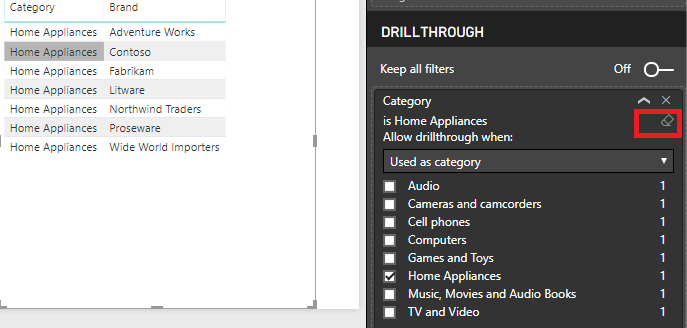
If you want to show all data after drill through, you could click this icon highlight in red to clear the filter but it will still exist when you drillthrough to this page next time.


Untitled.png


If you really don't want show the specific data in the page, you may could try with Bookmark feature.


Best Reggards,

Cherry

Community Support Team _ Cherry Gao
If this post helps, then please consider Accept it as the solution to help the other members find it more quickly.

View solution in original post

5 REPLIES 5
Anonymous
Not applicable

I've done this by creating a "Reset Filters" button linked to a bookmark of the page with no filters applied.

Anonymous
Not applicable

You can click on the eraser icon for the filter your want to clear in your Filters pane

Anonymous
Not applicable

There is no eraser on the slicer when you drill through to a page.

Hi @Anonymous,


Actually, Drillthrough is used to create a page in your report that focuses on a specific entity.


If you want to show all data after drill through, you could click this icon highlight in red to clear the filter but it will still exist when you drillthrough to this page next time.


Untitled.png


If you really don't want show the specific data in the page, you may could try with Bookmark feature.


Best Reggards,

Cherry

Community Support Team _ Cherry Gao
If this post helps, then please consider Accept it as the solution to help the other members find it more quickly.
MauriceMecowe
Resolver II
Resolver II

Hi @Anonymous


You can use the edit interactions under the Format menu, when you have selected the visual. Then you can make sure that the drill through visual will not respond to selections made on certains slicers.


KR,

Maurice

Helpful resources

Announcements
Fabric Data Days is here Carousel

Fabric Data Days 2026

Don't miss out on Data Days, June 15 through August 7. Learn Fabric, Power BI, SQL, AI and more.

May Power BI Update Carousel

Power BI Monthly Update - May 2026

Check out the May 2026 Power BI update to learn about new features.

Power BI DataViz World Championships carousel

Power BI DataViz World Championships - June 2026

A new Power BI DataViz World Championship is coming this June! Don't miss out on submitting your entry.