Get certified for free when you join Fabric Data Days 2026 and dive into Fabric, Power BI, SQL, AI, and other essential data skills.
Join nowTry your skills in the Power BI Dataviz World Championship! Round one ends June 26. Join now
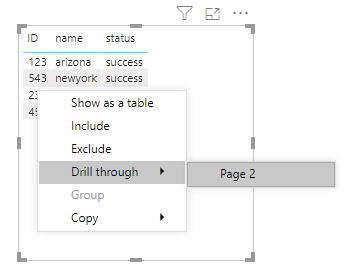
i have a table with ID, name and status like below. i have page for each ID with description details. when i righclick on ID 123 i want to see only 123 drill thru option instead all other ID drill thru page options.
please help me if their is any other way i can accomplish this scenario.
ID name status
123 arizona success
234 Texas failed
456 virginia success
543 newyork success
Hi @Anonymous ,
As @jdbuchanan71 mentioned, you need to create a new page to enable drillthrough, put the [ID] column in the drill-through fields filter, set it as 'Used as category', then you can return to your home page, right click ID field in the table visual to use drillthrough to get the corresponding information in the drillthrough page.
You can also refer this document about using drill through in details: Set up drill through in Power BI reports
Best Regards,
Yingjie Li
If this post helps then please consider Accept it as the solution to help the other members find it more quickly.
@Anonymous , There is something in May release see if this can help
https://powerbi.microsoft.com/en-us/blog/power-bi-desktop-may-2020-feature-summary/#_Cond_dest_drill
Interesting @amitchandak I guess you could do it with a SWITCH() in the destination measure using the SELECTEDVALUE of the ID column. That would still require a page for every ID which seems less than ideal if you are showing the same view for each ID though.
@Anonymous
That's not really how drillthrough works. You only need one drillthrough target page, not one for each ID. Then when you right click on a single ID and drillthrough that ID is used as a filter on the drillthrough page.
Don't miss out on Data Days, June 15 through August 7. Learn Fabric, Power BI, SQL, AI and more.
Check out the May 2026 Power BI update to learn about new features.
| User | Count |
|---|---|
| 24 | |
| 22 | |
| 21 | |
| 20 | |
| 14 |
| User | Count |
|---|---|
| 58 | |
| 52 | |
| 41 | |
| 33 | |
| 32 |