cancel
Showing results for 
Search instead for 
Did you mean: 

July 28 - August 9 | Final Round of the Power BI Dataviz World Championships. This is your chance. Learn more

Reply
Anonymous
Not applicable

Drill thru functionality

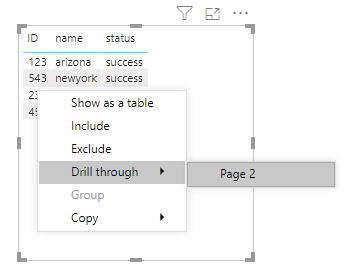
i have a table with ID, name and status like below. i have page for each ID with description details. when i righclick on ID 123 i want to see only 123 drill thru option instead all other ID drill thru page options.


please help me if their is any other way i can accomplish this scenario. 


ID      name    status

123    arizona   success

234    Texas      failed

456    virginia    success

543    newyork   success


4 REPLIES 4
v-yingjl
Community Support
Community Support

Hi @Anonymous ,

As @jdbuchanan71  mentioned, you need to create a new page to enable drillthrough, put the [ID] column in the drill-through fields filter, set it as 'Used as category', then you can return to your home page, right click ID field in the table visual to use drillthrough to get the corresponding information in the drillthrough page.

drillthrough.pngD1.pngd2.png

You can also refer this document about using drill through in details: Set up drill through in Power BI reports 


Best Regards,
Yingjie Li

If this post helps then please consider Accept it as the solution to help the other members find it more quickly.


amitchandak
Super User
Super User

@Anonymous , There is something in May release see if this can help

https://powerbi.microsoft.com/en-us/blog/power-bi-desktop-may-2020-feature-summary/#_Cond_dest_drill

Share with Power BI Enthusiasts: Full Power BI Video (20 Hours) YouTube
Microsoft Fabric Series 60+ Videos YouTube
Microsoft Fabric Hindi End to End YouTube

Interesting @amitchandak I guess you could do it with a SWITCH() in the destination measure using the SELECTEDVALUE of the ID column.  That would still require a page for every ID which seems less than ideal if you are showing the same view for each ID though.

jdbuchanan71
Super User
Super User

@Anonymous 

That's not really how drillthrough works.  You only need one drillthrough target page, not one for each ID.  Then when you right click on a single ID and drillthrough that ID is used as a filter on the drillthrough page.

Helpful resources

Announcements
FabCon and SQLCon Barcelona 2026

FabCon & SQLCon – Barcelona 2026

Join us in Barcelona for FabCon and SQLCon, the Fabric, Power BI, SQL, and AI community event. Save €200 with code FABCMTY200.

Fabric Community Sticker Design Challenge Barcelona Carousel

Fabric Community Sticker Challenge - Barcelona 2026

If you love stickers, then you will definitely want to check out our community sticker challenge, Barcelona edition!

July Power BI Update Carousel

Power BI Monthly Update - July 2026

Check out the July 2026 Power BI update to learn about new features.

Power BI DataViz World Championships carousel

Power BI DataViz World Championships - June 2026

A new Power BI DataViz World Championship is coming this June! Don't miss out on submitting your entry.

Top Solution Authors