cancel
Showing results for 
Search instead for 
Did you mean: 

Get Fabric Certified for FREE during Fabric Data Days. Don't miss your chance! Request now

Reply
Anonymous
Not applicable

Drill Down has problem with hierarchies

Hi,


I have a date field (with automatic hierarchies) that  is used with a measure to display the visuals.

When I tried to bring in Week number...I noticed an issue.


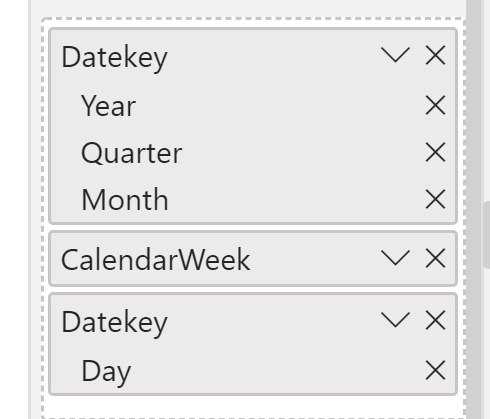
Step 1: Add Year, Qtr, Month from Date hierarchy

Step 2: Add WeekNo (Custom column)

Step 3: Add Day from Date Hierarchy


DrillDown on the fields..

After Year-->Qtr-->Month   instead of WeekNo showing up, "Day" from hierarchy Shows up.

Drill down again, WeekNo shows up in the right order and the chart displays correctly.


Please fix this bug.


Thanks,

Mannu


1 ACCEPTED SOLUTION
v-alq-msft
Community Support
Community Support

Hi, @Anonymous 


The date hierarchy is automatically generated with four levels: Year, Quarter, Month, and Day. You are unable to add a column in the structure. The auto date/time generated hierarchy can be used to configure a visual in exactly the same way that regular hierarchies can be used. Visuals can be configured by using the entire Date Hierarchy hierarchy, or specific levels of the hierarchy.


For further information, I'd like to suggest you refer the document .


Best Regards

Allan


If this post helps, then please consider Accept it as the solution to help the other members find it more quickly.

View solution in original post

3 REPLIES 3
v-alq-msft
Community Support
Community Support

Hi, @Anonymous 


The date hierarchy is automatically generated with four levels: Year, Quarter, Month, and Day. You are unable to add a column in the structure. The auto date/time generated hierarchy can be used to configure a visual in exactly the same way that regular hierarchies can be used. Visuals can be configured by using the entire Date Hierarchy hierarchy, or specific levels of the hierarchy.


For further information, I'd like to suggest you refer the document .


Best Regards

Allan


If this post helps, then please consider Accept it as the solution to help the other members find it more quickly.

Mariusz
Community Champion
Community Champion

Hi @Anonymous 


If this is what you have done then it seems to work well on my end.


image.png

Make sure that you use the most recent version of Power BI desktop. 

Ps. the best practice is to use Date Dimension tables instead of date hierarchies, please refer to the below.

https://radacad.com/create-a-date-dimension-in-power-bi-in-4-steps-step-1-calendar-columns


Best Regards,
Mariusz

If this post helps, then please consider Accepting it as the solution.

Please feel free to connect with me.
LinkedIn


amitchandak
Super User
Super User

@Anonymous , Create custom Hierarchy

https://stoneridgesoftware.com/creating-hierarchies-in-power-bi/
https://www.youtube.com/watch?v=x6vXVJZ_eTY

Share with Power BI Enthusiasts: Full Power BI Video (20 Hours) YouTube
Microsoft Fabric Series 60+ Videos YouTube
Microsoft Fabric Hindi End to End YouTube

Helpful resources

Announcements
November Power BI Update Carousel

Power BI Monthly Update - November 2025

Check out the November 2025 Power BI update to learn about new features.

Fabric Data Days Carousel

Fabric Data Days

Advance your Data & AI career with 50 days of live learning, contests, hands-on challenges, study groups & certifications and more!

FabCon Atlanta 2026 carousel

FabCon Atlanta 2026

Join us at FabCon Atlanta, March 16-20, for the ultimate Fabric, Power BI, AI and SQL community-led event. Save $200 with code FABCOMM.

Top Solution Authors
Top Kudoed Authors