This time we’re going bigger than ever. Fabric, Power BI, SQL, AI and more. We're covering it all. You won't want to miss it.
Learn moreLevel up your Power BI skills this month - build one visual each week and tell better stories with data! Get started
Hi All,
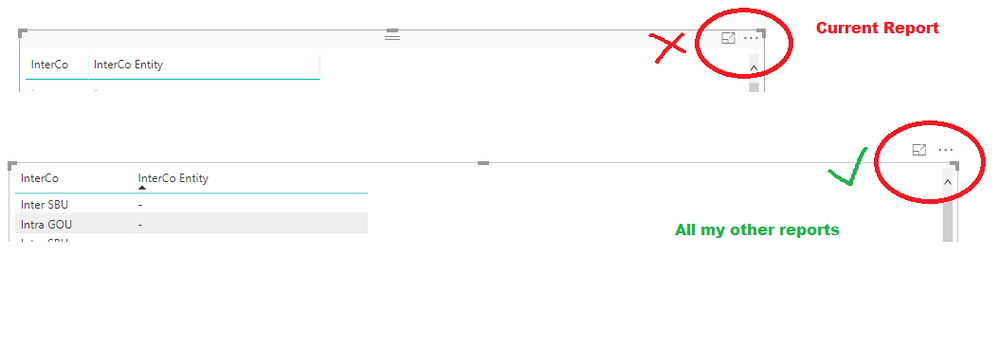
I have a problem that is driving me up the wall. I have created a Report in Desktop that works perfectly well, but when I want to Drag/Select each visualisation to edit/resize/move etc I have to precisely select the "border" of it which is difficult and time consuming. All the other reports that I have, I can select the area above, like you woudl select the title bar in a Window. I can't see the difference between all my other reports and this one. Can anyone please help? (in the picture If I select where the red cross is nothing happens, but in my other reports, when I select where the green tick is, I can drag/select)
Thank you in advance
Andrew
Hi @Anonymous,
Based on my research, I am afraid you could not achieve this feature currently, I suggest you submit an idea in ideas forum:
https://ideas.powerbi.com/forums/265200-power-bi-ideas
Regards,
Daniel He
Hi Daniel,
Thanks for replying. This isn't a feature though, this is a problem I am having. I want to be able to drag things around in my latest report in the same way that I do in all the other reports that I have written before. THere must be some setting that needs changing, and I don't know what.
Andrew
@Anonymous
I noticed the same issue as well. But i noticed it when i installed the latest PowerBI desktop (October update).
Can you check if this is the case. Maybe by reinstalling a previous version?
Check out the April 2026 Power BI update to learn about new features.
Sign up to receive a private message when registration opens and key events begin.
If you have recently started exploring Fabric, we'd love to hear how it's going. Your feedback can help with product improvements.
| User | Count |
|---|---|
| 35 | |
| 31 | |
| 26 | |
| 21 | |
| 18 |
| User | Count |
|---|---|
| 68 | |
| 37 | |
| 33 | |
| 23 | |
| 23 |