cancel
Showing results for 
Search instead for 
Did you mean: 

Try your skills in the Power BI Dataviz World Championship! Round one ends June 26. Join now

Reply
uchinaru
Frequent Visitor

Doubt

Dears, good morning!

What would be the reporting model for this outcome?

visuals_630_472.jpg

1 ACCEPTED SOLUTION

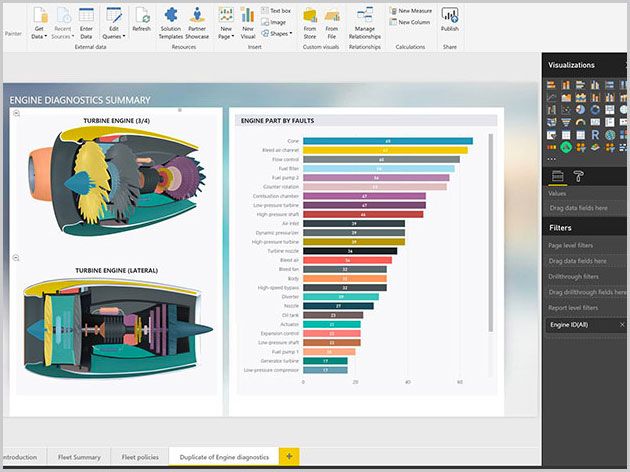
So, the one on the left is definitely a custom visual, perhaps a Visio custom visual but probably not. Could be something that was custom written and not in the gallery. One on the right could also be a custom visual but you could use a bar chart visual for that.


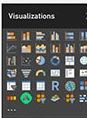
One on the left is definitely not a "stock" visual and may or may not be in the gallery of custom visuals. As you can see in the picture you just posted, everything after the "R" is a custom visual that was imported. So, you might be able to match up the icons with custom visuals in the custom visual gallery...maybe.


Follow on LinkedIn
@ me in replies or I'll lose your thread!!!
Instead of a Kudo, please vote for this idea
Become an expert!: Enterprise DNA
External Tools: MSHGQM
YouTube Channel!: Microsoft Hates Greg
Latest book!:
DAX For Humans

DAX is easy, CALCULATE makes DAX hard...

View solution in original post

4 REPLIES 4
uchinaru
Frequent Visitor

Someone ?

I'm not clear on your question. What do you mean by "reporting model"? 


Follow on LinkedIn
@ me in replies or I'll lose your thread!!!
Instead of a Kudo, please vote for this idea
Become an expert!: Enterprise DNA
External Tools: MSHGQM
YouTube Channel!: Microsoft Hates Greg
Latest book!:
DAX For Humans

DAX is easy, CALCULATE makes DAX hard...

@Greg_Deckler What is the name of this report that shows the pieces so that I can insert

visuals_630_472343.jpg


So, the one on the left is definitely a custom visual, perhaps a Visio custom visual but probably not. Could be something that was custom written and not in the gallery. One on the right could also be a custom visual but you could use a bar chart visual for that.


One on the left is definitely not a "stock" visual and may or may not be in the gallery of custom visuals. As you can see in the picture you just posted, everything after the "R" is a custom visual that was imported. So, you might be able to match up the icons with custom visuals in the custom visual gallery...maybe.


Follow on LinkedIn
@ me in replies or I'll lose your thread!!!
Instead of a Kudo, please vote for this idea
Become an expert!: Enterprise DNA
External Tools: MSHGQM
YouTube Channel!: Microsoft Hates Greg
Latest book!:
DAX For Humans

DAX is easy, CALCULATE makes DAX hard...

Helpful resources

Announcements
Fabric Data Days is here Carousel

Fabric Data Days 2026

Don't miss out on Data Days, June 15 through August 7. Learn Fabric, Power BI, SQL, AI and more.

Power BI DataViz World Championships carousel

Power BI DataViz World Championships - June 2026

A new Power BI DataViz World Championship is coming this June! Don't miss out on submitting your entry.