
cancel
Showing results for 
Search instead for 
Did you mean: 

The Power BI Data Visualization World Championships is back! Get ahead of the game and start preparing now! Learn more

Reply
Anonymous
Not applicable

Does not recognize the measures even through it is there

I have two measure and they work by themselves.

CPS_UniqueMPNIDv2 = DISTINCTCOUNT(SQL_PartnerStatusReport[PartnerMPNID])

CPS_TotalNominationCount = SUM(SQL_PartnerStatusReport[NominationCount])


When I divide one with the other to get a average,

AverageEarningsPerUniquePartnerCount = DIVIDE(CPS_TotalNominationCount, CPS_UniqueMPNIDv2, 0)

I get the message 'CPS_TotalNominationCount'. It is not a valid table, variable, or function name. It highlights both measures actually.

Appreciate your help. Thanks

2 ACCEPTED SOLUTIONS
Anand24
Super User
Super User

Hi @Anonymous ,
Are both of these calculated measures or calculated columns? The 3rd measure you are creating, is it also a calculated measure or calculated column?
Please share a screenshot of error message.


Also, please try to enclose the measure names within square brackets once

PBI_SuperUser_Rank@1x.png  

Give a Thumbs Up if this post helped you in any way and Mark This Post as Solution if it solved your query !!!

Proud To Be a Super User !!!
LinkedIn

View solution in original post

Anonymous
Not applicable

I figured it out. Had to reference the measure by providing the Measure table name. This worked. Thanks for pointing me in the right direction.

AverageEarningsPerUniquePartnerCount = DIVIDE(MCAP_Measures_Calcs[CPS_TotalNominationCount], MCAP_Measures_Calcs[CPS_UniqueMPNIDv2], 0)

View solution in original post

5 REPLIES 5
Anonymous
Not applicable

here is the screen shot of the error message

IshPradhan_1-1679939794174.png


Anonymous
Not applicable

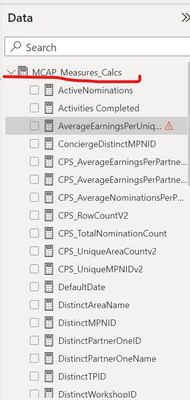
I have them all in the measures table

IshPradhan_0-1679939698687.png


Anonymous
Not applicable

I figured it out. Had to reference the measure by providing the Measure table name. This worked. Thanks for pointing me in the right direction.

AverageEarningsPerUniquePartnerCount = DIVIDE(MCAP_Measures_Calcs[CPS_TotalNominationCount], MCAP_Measures_Calcs[CPS_UniqueMPNIDv2], 0)
Anand24
Super User
Super User

Hi @Anonymous ,
Are both of these calculated measures or calculated columns? The 3rd measure you are creating, is it also a calculated measure or calculated column?
Please share a screenshot of error message.


Also, please try to enclose the measure names within square brackets once

PBI_SuperUser_Rank@1x.png  

Give a Thumbs Up if this post helped you in any way and Mark This Post as Solution if it solved your query !!!

Proud To Be a Super User !!!
LinkedIn

Anonymous
Not applicable

both of these are calculated measures, the third one is also a calculated measure and the uses the first two measures

Helpful resources

Announcements
Power BI DataViz World Championships

Power BI Dataviz World Championships

The Power BI Data Visualization World Championships is back! Get ahead of the game and start preparing now!

November Power BI Update Carousel

Power BI Monthly Update - November 2025

Check out the November 2025 Power BI update to learn about new features.

FabCon Atlanta 2026 carousel

FabCon Atlanta 2026

Join us at FabCon Atlanta, March 16-20, for the ultimate Fabric, Power BI, AI and SQL community-led event. Save $200 with code FABCOMM.