cancel
Showing results for 
Search instead for 
Did you mean: 

The Power BI Data Visualization World Championships is back! Get ahead of the game and start preparing now! Learn more

Reply
Anonymous
Not applicable

Dividing Values to a Constant Interval Date

Hello,


I'm working on a table which has these columns:

- Date (1st March 2020 to 21st May 2020)

- Amount

- Name of Product


I want to track the changes in the dates. The logic is: 1st March is Sunday so starting from 8st March, I want all sunday days (8, 15, 22 March or 21, 28 April, etc) to be divided by 1st of march value.

Ex:

1 Mar: 100

8 Mar: 125

15 Mar: 110


then I want to have on

8 Mar: 1.25

15 Mar 1.1 etc.


How can I do that?


Thanks.


1 ACCEPTED SOLUTION

Hi @Anonymous ,


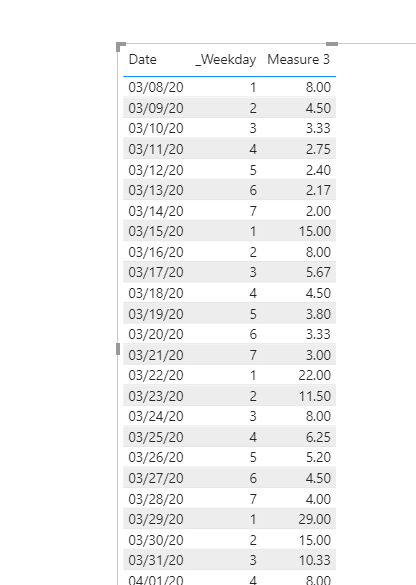
Please refer to my .pbix file.

Measure 3 = 
IF(
    SELECTEDVALUE(Sheet2[Weekday]) = SELECTEDVALUE('Table'[_Weekday]) && SELECTEDVALUE(Sheet2[Date]) > DATE(2020, 3, 7),
    DIVIDE( SELECTEDVALUE(Sheet2[Amount]), SELECTEDVALUE('Table'[_Amount] ) )
)

ee7.PNG


Best regards,
Lionel Chen

If this post helps, then please consider Accept it as the solution to help the other members find it more quickly.


View solution in original post

5 REPLIES 5
Anonymous
Not applicable

Hi @Anonymous ,


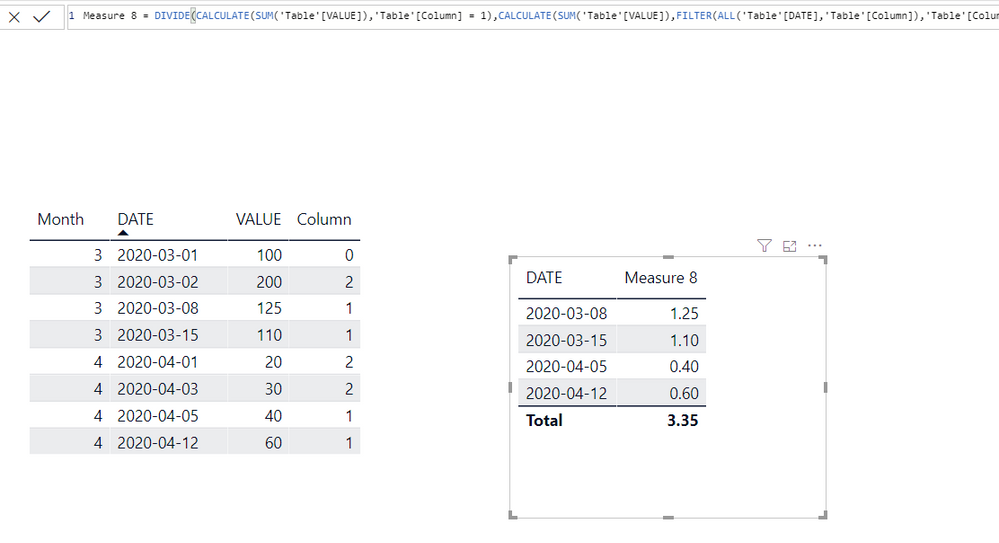
I created some sample data on my desktop, and I hope the result is what you want.


Column = VAR TEST = CALCULATE(MIN('Table'[DATE]),ALL('Table'))
          RETURN  IF('Table'[DATE] = TEST,0,IF(WEEKDAY('Table'[DATE]) = WEEKDAY(TEST),1,2))
Measure 8 = DIVIDE(CALCULATE(SUM('Table'[VALUE]),'Table'[Column] = 1),CALCULATE(SUM('Table'[VALUE]),FILTER(ALL('Table'[DATE],'Table'[Column]),'Table'[Column] = 0)))


Dividing Values to a Constant Interval Date.PNG


Please try.

Aiolos Zhao

Anonymous
Not applicable

Hello,

@Anonymous @v-lionel-msft 

Both answers didn't work Let me clarify myself I think I didn't express myself well.


My table is on the link as excel file ( https://bit.ly/2ZZbsCT ). the first week is my control week (1-7 march) and starting from 8th Mar, I want all sundays (8, 15, 22 Mar, etc) to be divided by 1st Mar, all thursdays (12, 19, 26 Mar, etc) to be divided by 5th March, etc.


By the way, I'm showing one of the product code as an ex. There are a lot more.


Hi @Anonymous ,


Please refer to my .pbix file.

Measure 3 = 
IF(
    SELECTEDVALUE(Sheet2[Weekday]) = SELECTEDVALUE('Table'[_Weekday]) && SELECTEDVALUE(Sheet2[Date]) > DATE(2020, 3, 7),
    DIVIDE( SELECTEDVALUE(Sheet2[Amount]), SELECTEDVALUE('Table'[_Amount] ) )
)

ee7.PNG


Best regards,
Lionel Chen

If this post helps, then please consider Accept it as the solution to help the other members find it more quickly.


Anonymous
Not applicable

It seems working. Thanks a lot for your help!

v-lionel-msft
Community Support
Community Support

Hi @Anonymous ,


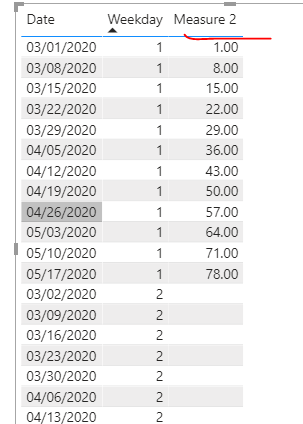
Try to do like this.

Measure 2 = 
VAR x = 
CALCULATE(
    MAX(Sheet2[Amount]),
    FILTER(
        ALL(Sheet2),
        Sheet2[Date] = DATE(2020, 3, 1)
    )
)
VAR y = 
CALCULATE(
    MAX(Sheet2[Amount]),
    FILTER(
        Sheet2,
        Sheet2[Weekday] = 1
    )
)
RETURN
DIVIDE(
    y, x, BLANK()
)

ee1.PNG


Best regards,
Lionel Chen

If this post helps, then please consider Accept it as the solution to help the other members find it more quickly.

Helpful resources

Announcements
Power BI DataViz World Championships

Power BI Dataviz World Championships

The Power BI Data Visualization World Championships is back! Get ahead of the game and start preparing now!

November Power BI Update Carousel

Power BI Monthly Update - November 2025

Check out the November 2025 Power BI update to learn about new features.

FabCon Atlanta 2026 carousel

FabCon Atlanta 2026

Join us at FabCon Atlanta, March 16-20, for the ultimate Fabric, Power BI, AI and SQL community-led event. Save $200 with code FABCOMM.