Learn from the best! Meet the four finalists headed to the FINALS of the Power BI Dataviz World Championships! Register now
hi all,
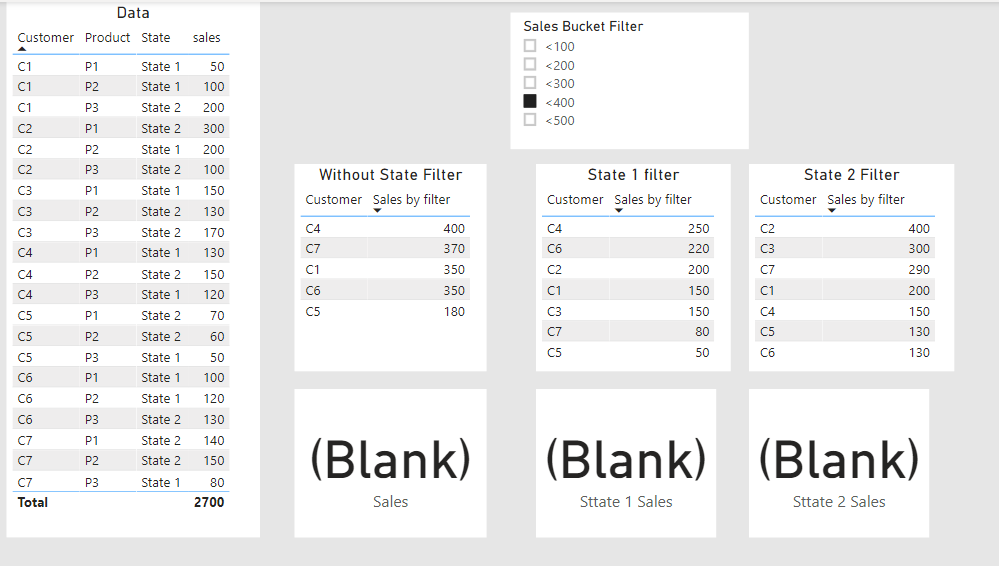
i want to filter measure value by using parameter selection
i'm using following measure value. its working fine in table. but it's not shown total value in KPI card.
how can i show total vale in KPI Card?
i have attached Test file Pbix File
Sales by filter =
VAR m = max('Table (2)'[Sales Bucket Value])
RETURN
CALCULATE ( SUM ( 'Table'[sales] ), FILTER ( 'Table', sum('Table'[sales]) <= m ) )
Solved! Go to Solution.
Hi @Anonymous
try this.
Sales by filter =
VAR m = max('Table (2)'[Sales Bucket Value])
RETURN
SUMX(FILTER(SUMMARIZE('Table','Table'[Customer],"Sum Sales",SUM('Table'[sales])),[Sum Sales] <= m), [Sum Sales])
Marcus Wegener works as Full Stack Power BI Engineer at BI or DIE.
His mission is clear: "Get the most out of data, with Power BI."
twitter - LinkedIn - YouTube - website - podcast - Power BI Tutorials
Hi @Anonymous
try this.
Sales by filter =
VAR m = max('Table (2)'[Sales Bucket Value])
RETURN
SUMX(FILTER(SUMMARIZE('Table','Table'[Customer],"Sum Sales",SUM('Table'[sales])),[Sum Sales] <= m), [Sum Sales])
Marcus Wegener works as Full Stack Power BI Engineer at BI or DIE.
His mission is clear: "Get the most out of data, with Power BI."
twitter - LinkedIn - YouTube - website - podcast - Power BI Tutorials
If you have recently started exploring Fabric, we'd love to hear how it's going. Your feedback can help with product improvements.
A new Power BI DataViz World Championship is coming this June! Don't miss out on submitting your entry.
Share feedback directly with Fabric product managers, participate in targeted research studies and influence the Fabric roadmap.
| User | Count |
|---|---|
| 57 | |
| 38 | |
| 34 | |
| 18 | |
| 16 |
| User | Count |
|---|---|
| 68 | |
| 67 | |
| 42 | |
| 30 | |
| 26 |