Join us at FabCon Atlanta from March 16 - 20, 2026, for the ultimate Fabric, Power BI, AI and SQL community-led event. Save $200 with code FABCOMM.
Register now!The Power BI Data Visualization World Championships is back! It's time to submit your entry. Live now!
Hi all,
I could not find the right formula for the below, can someone please assist:
I have two columns in one dataset, the one column is sales and the other is product quantity.
The sales column is not fully populated, but the quantity is.
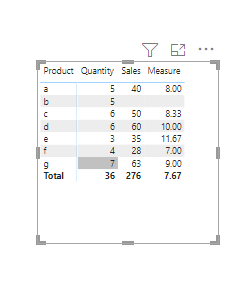
When I try and divide sales by quantity I get the correct information in a matrix, but the total is incorrect.
How do I divide the sales, looking at the quantity ONLY when there is a sales value?
Thanks,
Solved! Go to Solution.
Hi all,
I solved the incorrect totals by creating a calculated column and not a measure.
Thanks!
Hi all,
I solved the incorrect totals by creating a calculated column and not a measure.
Thanks!
Hi @John_V12 ,
Try to create a measure like below:
Measure = DIVIDE(SUM('Table'[Sales]),SUM('Table'[Quantity]))
If the problem persists, please share some sample data and the results you expect.
https://community.powerbi.com/t5/Desktop/How-to-Get-Your-Question-Answered-Quickly/m-p/1447523
Best Regards,
Liang
If this post helps, then please consider Accept it as the solution to help the other members find it more quickly.
Hi @John_V12
Try this...
DIVIDE(
[SalesValue],
[Quantity],
BLANK()
)
DIVIDE() function will substitute BLANK() for any row where it cannot perform division (Quantity = 0 or is missing a value).
Hope this helps!
The Power BI Data Visualization World Championships is back! It's time to submit your entry.
Check out the January 2026 Power BI update to learn about new features.
| User | Count |
|---|---|
| 61 | |
| 49 | |
| 30 | |
| 25 | |
| 23 |
| User | Count |
|---|---|
| 128 | |
| 102 | |
| 57 | |
| 39 | |
| 31 |