Join us at FabCon Atlanta from March 16 - 20, 2026, for the ultimate Fabric, Power BI, AI and SQL community-led event. Save $200 with code FABCOMM.
Register now!The Power BI Data Visualization World Championships is back! Get ahead of the game and start preparing now! Learn more
Hi - I have 2 tables, one containing a PRODUCT_VOLUME column and one containing a REGISTER_SIZE column. Both columns are linked by LEGAL_ID as the unique identifier (an additional column in both tables)
I want create a new column (as there is one row per month to this data and want to show it on a time chart) to divide the PRODUCT_VOLUME for the specific LEGAL_ID by the REGISTER_SIZE for that specific LEGAL_ID.
I'm a bit of a novice and so if anyone can help with the DAX that would be appreciated!
Solved! Go to Solution.
Hey @Anonymous
I should have used LOOKUP value; sorry about that.
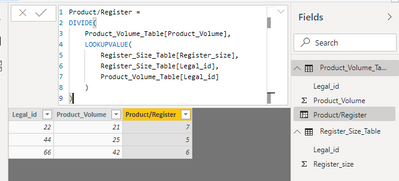
I tested this out & here is my DAX for the calculated column:
Product/Register =
DIVIDE(
Product_Volume_Table[Product_Volume],
LOOKUPVALUE(
Register_Size_Table[Register_size],
Register_Size_Table[Legal_id],
Product_Volume_Table[Legal_id]
)
)
Keep in mind I don't know the name of your tables, so the name of my tables are probably different than yours. I'm including my pbix file so you can see how I have things set up.
Click HERE to access my pbix file.
@Anonymous
Hey!
When I have two tables (A & B) and want to reference a value in a column in table B in a calculated column in table A when they are related, I use the LOOKUP expression.
Maybe in your situation you can use something like this:
New Column =
DIVIDE(
PRODUCT_VOLUME,
LOOKUP(
REGISTER_SIZE table[REGISTER_SIZE column],
REGISTER_SIZE table[LEGAL_ID column],
PRODUCT_VOLUME table[LEGAL_ID column]
)
)Something like this could be used if adding a calculated column in the table that contains the PRODUCT_VOLUME column.
Thanks, can't quite get it to work. Shoudl it be LOOKUPVALUE instead of just LOOKUP?
The error I get when using LOOKUPVALUE appears to not be able to find the REGISTER_SIZE table - is there something special I need to add in to get it to recognise looking at another table?
Hey @Anonymous
I should have used LOOKUP value; sorry about that.
I tested this out & here is my DAX for the calculated column:
Product/Register =
DIVIDE(
Product_Volume_Table[Product_Volume],
LOOKUPVALUE(
Register_Size_Table[Register_size],
Register_Size_Table[Legal_id],
Product_Volume_Table[Legal_id]
)
)
Keep in mind I don't know the name of your tables, so the name of my tables are probably different than yours. I'm including my pbix file so you can see how I have things set up.
Click HERE to access my pbix file.
Perfect thank you!
The Power BI Data Visualization World Championships is back! Get ahead of the game and start preparing now!
| User | Count |
|---|---|
| 41 | |
| 39 | |
| 37 | |
| 29 | |
| 24 |
| User | Count |
|---|---|
| 122 | |
| 110 | |
| 83 | |
| 69 | |
| 68 |