Join us at FabCon Atlanta from March 16 - 20, 2026, for the ultimate Fabric, Power BI, AI and SQL community-led event. Save $200 with code FABCOMM.
Register now!Get Fabric Certified for FREE during Fabric Data Days. Don't miss your chance! Request now
Hi - I have 2 tables, one containing a PRODUCT_VOLUME column and one containing a REGISTER_SIZE column. Both columns are linked by LEGAL_ID as the unique identifier (an additional column in both tables)
I want create a new column (as there is one row per month to this data and want to show it on a time chart) to divide the PRODUCT_VOLUME for the specific LEGAL_ID by the REGISTER_SIZE for that specific LEGAL_ID.
I'm a bit of a novice and so if anyone can help with the DAX that would be appreciated!
Solved! Go to Solution.
Hey @Anonymous
I should have used LOOKUP value; sorry about that.
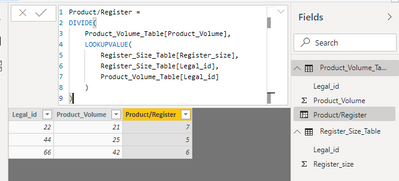
I tested this out & here is my DAX for the calculated column:
Product/Register =
DIVIDE(
Product_Volume_Table[Product_Volume],
LOOKUPVALUE(
Register_Size_Table[Register_size],
Register_Size_Table[Legal_id],
Product_Volume_Table[Legal_id]
)
)
Keep in mind I don't know the name of your tables, so the name of my tables are probably different than yours. I'm including my pbix file so you can see how I have things set up.
Click HERE to access my pbix file.
@Anonymous
Hey!
When I have two tables (A & B) and want to reference a value in a column in table B in a calculated column in table A when they are related, I use the LOOKUP expression.
Maybe in your situation you can use something like this:
New Column =
DIVIDE(
PRODUCT_VOLUME,
LOOKUP(
REGISTER_SIZE table[REGISTER_SIZE column],
REGISTER_SIZE table[LEGAL_ID column],
PRODUCT_VOLUME table[LEGAL_ID column]
)
)Something like this could be used if adding a calculated column in the table that contains the PRODUCT_VOLUME column.
Thanks, can't quite get it to work. Shoudl it be LOOKUPVALUE instead of just LOOKUP?
The error I get when using LOOKUPVALUE appears to not be able to find the REGISTER_SIZE table - is there something special I need to add in to get it to recognise looking at another table?
Hey @Anonymous
I should have used LOOKUP value; sorry about that.
I tested this out & here is my DAX for the calculated column:
Product/Register =
DIVIDE(
Product_Volume_Table[Product_Volume],
LOOKUPVALUE(
Register_Size_Table[Register_size],
Register_Size_Table[Legal_id],
Product_Volume_Table[Legal_id]
)
)
Keep in mind I don't know the name of your tables, so the name of my tables are probably different than yours. I'm including my pbix file so you can see how I have things set up.
Click HERE to access my pbix file.
Perfect thank you!
Check out the November 2025 Power BI update to learn about new features.
Advance your Data & AI career with 50 days of live learning, contests, hands-on challenges, study groups & certifications and more!