cancel
Showing results for 
Search instead for 
Did you mean: 

Vote for your favorite vizzies from the Power BI Dataviz World Championship submissions. Vote now!

Reply

Divide Total values

Hello,


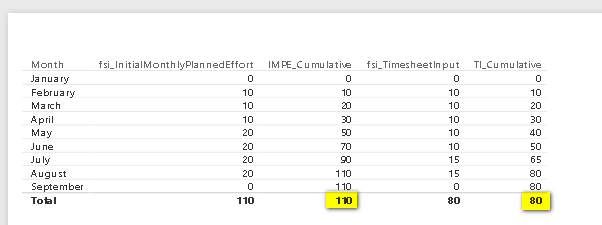
Is it possible to divide Total values and add it to a new measure?


TotalValues.png


For example in this screenshot, I would like to divide the 80/100, where both are measure values already.


Thank you,

Hayman

1 ACCEPTED SOLUTION
mattbrice
Solution Sage
Solution Sage

"Is it possible to divide Total values and add it to a new measure?"  


Don't know what this means.  Do you mean create a new measure in this same table that just shows the quotient at the "Total" row?  Or display in a completely different table/visual?  Because all you should have to do is:  


Divide Measure = DIVIDE( [TI_Cumulative] , [IMPE_Cumulative]  )

View solution in original post

2 REPLIES 2
mattbrice
Solution Sage
Solution Sage

"Is it possible to divide Total values and add it to a new measure?"  


Don't know what this means.  Do you mean create a new measure in this same table that just shows the quotient at the "Total" row?  Or display in a completely different table/visual?  Because all you should have to do is:  


Divide Measure = DIVIDE( [TI_Cumulative] , [IMPE_Cumulative]  )

Please advise.


Regards,

Hayman

Helpful resources

Announcements
Power BI DataViz World Championships

Power BI Dataviz World Championships

Vote for your favorite vizzies from the Power BI World Championship submissions!

Sticker Challenge 2026 Carousel

Join our Community Sticker Challenge 2026

If you love stickers, then you will definitely want to check out our Community Sticker Challenge!

January Power BI Update Carousel

Power BI Monthly Update - January 2026

Check out the January 2026 Power BI update to learn about new features.

FabCon Atlanta 2026 carousel

FabCon Atlanta 2026

Join us at FabCon Atlanta, March 16-20, for the ultimate Fabric, Power BI, AI and SQL community-led event. Save $200 with code FABCOMM.