Join us in Barcelona for FabCon and SQLCon, September 28 - October 1, 2026.
This is best Fabric, Power BI, SQL and AI community event. How do we know? The last event sold out! Save €200 with code FABCMTY200.
Register now- Power BI forums
- Get Help with Power BI
- Desktop
- Service
- Report Server
- Power Query
- Mobile Apps
- Developer
- DAX Commands and Tips
- Custom Visuals Development Discussion
- Health and Life Sciences
- Power BI Spanish forums
- Translated Spanish Desktop
- Training and Consulting
- Instructor Led Training
- Dashboard in a Day for Women, by Women
- Galleries
- Data Stories Gallery
- Themes Gallery
- Contests Gallery
- QuickViz Gallery
- Quick Measures Gallery
- Visual Calculations Gallery
- Fabric Apps Gallery
- Notebook Gallery
- Translytical Task Flow Gallery
- TMDL Gallery
- R Script Showcase
- Webinars and Video Gallery
- Ideas
- Custom Visuals Ideas (read-only)
- Issues
- Issues
- Events
- Upcoming Events
The Fabric community is upgrading! Read all of the details including the timeline and what you can expect. Learn more
- Power BI forums
- Forums
- Get Help with Power BI
- Desktop
- Re: Divide Measures
- Subscribe to RSS Feed
- Mark Topic as New
- Mark Topic as Read
- Float this Topic for Current User
- Bookmark
- Subscribe
- Printer Friendly Page


- Mark as New
- Bookmark
- Subscribe
- Mute
- Subscribe to RSS Feed
- Permalink
- Report Inappropriate Content
Divide Measures
Hello dear PowerBI community,
I do need your help regarding a calculation i want to do with 2 created measures:
I do have 2 measures:
TO2016 cumul.
and
TO2017 cumul.
These 2 measures show the cumulated turnover over the months of the specific year.
Now I tried to compare those 2 measures and what I want to see is the percentual change of the turnover from this year compared to last year cumulated per month:
Dev. vs. Cumul. 2016 = DIVIDE(TOTALYTD(SUM(RE2016[TO2016])|'Calendar'[Date])|(TOTALYTD(SUM(RE2017act[TO2017])|'Calendar'[Date])))
This DAX-Expression somehow doesn't show any values on the table chart on my Power BI Desktop. Any suggestions how to proceed on this one?

- Mark as New
- Bookmark
- Subscribe
- Mute
- Subscribe to RSS Feed
- Permalink
- Report Inappropriate Content
Hello,
I have a somewhat similar issue:
I’m required to divide the aggregated sum of two values in two different Periods (P6/ P12) and Scenarios (Actual/Budget). The issue is how to store the values and then utilise them in the final measure - Actual#MAP131_ARO while using only P6 in the Period Slicer or preferrably P6 and P12 in the Visual Filter
- A#MAP131_P6 =
CALCULATE(
SUM(GRA_extract[Value]),
FILTER(GRA_extract, GRA_extract[Account]="MAP131"),
FILTER (GRA_extract, GRA_extract[Currency]="GBP"),
NOT(GRA_extract[ServiceLine]) IN {"AllCustom2","TotalUnit","AboveUnit", "TotalAbove", "TotalServices"},
NOT(GRA_extract[Sector]) IN {"AllCustom1","TotalUnit","TotalSectors"},
FILTER ( GRA_extract, GRA_extract[Custom3] = "IFRS100PC" ),
FILTER ( GRA_extract, GRA_Extract[Period] = "P6" )
)
Result = 12623440.522209276
- A#MAP131_P12 =
CALCULATE(
SUM(GRA_extract[Value]),
FILTER(GRA_extract, GRA_extract[Account]="MAP131"),
FILTER (GRA_extract, GRA_Extract[Scenario]="Budget"),
NOT(GRA_extract[ServiceLine]) IN {"AllCustom2","TotalUnit","AboveUnit", "TotalAbove", "TotalServices"},
NOT(GRA_extract[Sector]) IN {"AllCustom1","TotalUnit","TotalSectors"},
FILTER ( GRA_extract, GRA_extract[Custom3] = "IFRS100PC" ),
FILTER ( GRA_extract, GRA_Extract[Period] = "P12" )
)
Result = 36209485.11878476
Actual#MAP131_ARO = ([A#MAP131_P6]/[A#MAP131_P12])
The final result is Infinity
I'd appreciate your kind advice.
- Mark as New
- Bookmark
- Subscribe
- Mute
- Subscribe to RSS Feed
- Permalink
- Report Inappropriate Content
Hi @Paddhof1984,
It will be help if you share some sample data and the measure formulas.
In addition, if your measure contains some specific filters or 'all' filter, they may not works in other measures.
Regards,
Xiaoxin Sheng
- Mark as New
- Bookmark
- Subscribe
- Mute
- Subscribe to RSS Feed
- Permalink
- Report Inappropriate Content
Hello,
my measures:
TO2016 cumul.:
TO2016 cumul. = TOTALYTD(SUM(RE2016[TO2016])|'Calendar'[Date])
TO2017 cumul.:
TO2017 cumul. = TOTALYTD(SUM(RE2017act[TO2017act])|FILTER(ALL('Calendar'[Date])|'Calendar'[Date]<=MAX(RE2017act[PurchDate])))
sample Data:
- Mark as New
- Bookmark
- Subscribe
- Mute
- Subscribe to RSS Feed
- Permalink
- Report Inappropriate Content
Hi @Paddhof1984,
Based on test ,your 'To2016 cumul' measure seems not works on table visual.
After I modify its formula, the divide measures will works.
TO2016 cumul. = TOTALYTD(SUM(RE2016[TO2016]),FILTER(ALLSELECTED('Calendar'[Date]),'Calendar'[Date]<=MAX(RE2016[PurchDate])))
TO2017 cumul. = TOTALYTD(SUM(RE2017act[TO2017act]),FILTER(ALLSELECTED('Calendar'[Date]),'Calendar'[Date]<=MAX(RE2017act[PurchDate])))
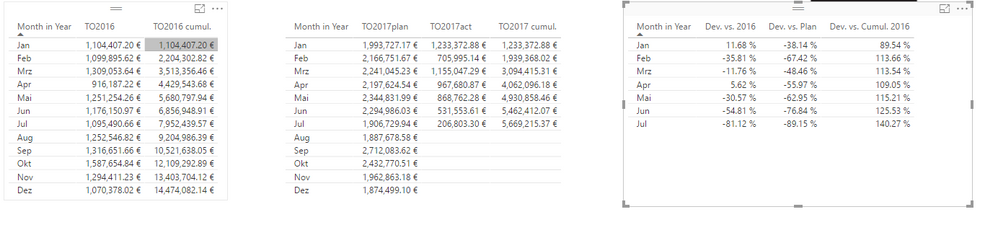
Regards,
Xiaoxin Sheng
- Mark as New
- Bookmark
- Subscribe
- Mute
- Subscribe to RSS Feed
- Permalink
- Report Inappropriate Content
@Anonymous Thanks a lot, the measures now show up on my new measure:
Dev. vs. Cumul. 2016 = DIVIDE('add calc'[TO2017 cumul.]-'add calc'[TO2016 cumul.]|'add calc'[TO2016 cumul.])
Last question regarding this one: how can I intersect this measure to only to show the dates of RE2017act[month].
If I add Intersect to Dev. vs. Cumul. 2016, the values shown on the chart are wrong or a error is shown.
- Mark as New
- Bookmark
- Subscribe
- Mute
- Subscribe to RSS Feed
- Permalink
- Report Inappropriate Content
Hi @Paddhof1984,
So you want to hide the blank records which not exists in 2017, right?
If this is a case, you can try to use below formula:
Dev. vs. Cumul= if(ISBLANK([TO2017 cumul.])=FALSE(), DIVIDE([TO2017 cumul.]-[TO2016 cumul.],[TO2016 cumul.],0))
Regards,
Xiaoxin Sheng
- Mark as New
- Bookmark
- Subscribe
- Mute
- Subscribe to RSS Feed
- Permalink
- Report Inappropriate Content
@Anonymous
Hello,
somehow, when I add the the turnover from my tables to a splitted bar chart, the procentual change over the year differs to the one from my measuers ([GT 2016]-[GT 2017])/[GT 2016].
Here's my sample file, maybe you can tell me, why there's a difference between the shown values and the values calculated by the measure:
- Mark as New
- Bookmark
- Subscribe
- Mute
- Subscribe to RSS Feed
- Permalink
- Report Inappropriate Content
Hi @Paddhof1984,
I double check on previous sample file and found that it has the same result on my side.
Notice: I create a new measure to store the new calculated formula, 'dev vs cumul 2016' is your original measure.

Regards,
Xiaoxin Sheng
- Mark as New
- Bookmark
- Subscribe
- Mute
- Subscribe to RSS Feed
- Permalink
- Report Inappropriate Content
This DAX-expression for an additional measure also doesn't shows any values on the chart:
Dev. vs. Cumul. 2016 = DIVIDE('add calc'[TO2017 cumul.]|('add calc'[TO2016 cumul.]))
- Mark as New
- Bookmark
- Subscribe
- Mute
- Subscribe to RSS Feed
- Permalink
- Report Inappropriate Content
Maybe you got any clue how to implement this DAX-Expression, so the right values show up on the report?
Helpful resources

FabCon & SQLCon – Barcelona 2026
Join us in Barcelona for FabCon and SQLCon, the Fabric, Power BI, SQL, and AI community event. Save €200 with code FABCMTY200.

Power BI DataViz World Championships - June 2026
A new Power BI DataViz World Championship is coming this June! Don't miss out on submitting your entry.

| User | Count |
|---|---|
| 24 | |
| 22 | |
| 20 | |
| 18 | |
| 14 |


| User | Count |
|---|---|
| 27 | |
| 22 | |
| 21 | |
| 20 | |
| 20 |


