cancel
Showing results for 
Search instead for 
Did you mean: 

We've captured the moments from FabCon & SQLCon that everyone is talking about, and we are bringing them to the community, live and on-demand. Starts on April 14th. Register now

Reply
smather
Helper III
Helper III

Divide Measure by a Column

Hi


I'm trying to divide a measure by a column (there's an active relationship between the tables) but it's not giving me the expected answer. 


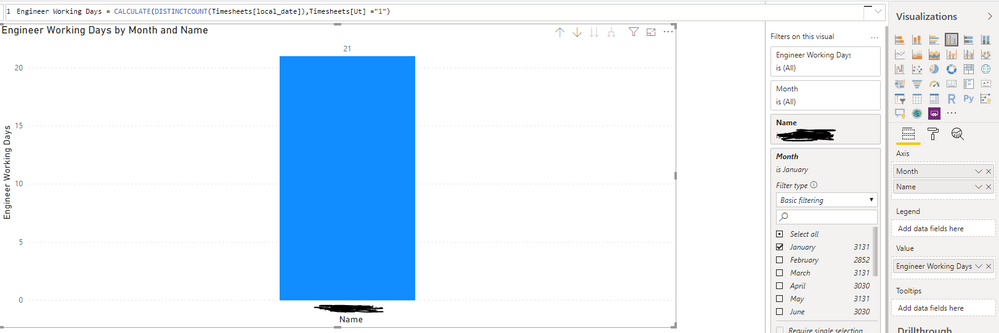
The measure works out the number of working days someone has had in a month, and the formula is:


Working Days = CALCULATE(DISTINCTCOUNT(Timesheets[local_date]),Timesheets[Ut] ="1") -- the Ut Column is a formula that makes sure two points are hit to class it as a working day. 
 
I then have a table that has the amount of working days per month for the year. 
 
So currently, for Jan, we have one person who Working Days measure works out as 21 for Jan. The number of working days in Jan is 22. So 21 / 22 = 0.9545454 * 100 gives me 95.45% for utilization for that month. 
 
But if I do a measure of: 
 
DIVIDE = [Working Days] / SUM('Number of Work Days Per Month'[Work Days]) and change it to % I get 8.30% 
 
I'm missing something very obvious here, but I'm too thick to figure out what. Any help would be fab, thanks
1 ACCEPTED SOLUTION

I was missing something! My realationship was wrong. As soon as it set it to both ways, rather than single, everything worked as it should. 

View solution in original post

3 REPLIES 3
parry2k
Super User
Super User

@smather can you share sample data and relationship diagram? Also how you are visualizing the data? Create another measure for sum of working days to check what value you are getting.


Subscribe to the @PowerBIHowTo YT channel for an upcoming video on List and Record functions in Power Query!!

Learn Power BI and Fabric - subscribe to our YT channel - Click here: @PowerBIHowTo

If my solution proved useful, I'd be delighted to receive Kudos. When you put effort into asking a question, it's equally thoughtful to acknowledge and give Kudos to the individual who helped you solve the problem. It's a small gesture that shows appreciation and encouragement! ❤


Did I answer your question? Mark my post as a solution. Proud to be a Super User! Appreciate your Kudos 🙂
Feel free to email me with any of your BI needs.

Hi @parry2k 


Currently it's in a graph, so it can be filtered by month and also to give a YTD view too. Here's how things look -- I dunno how to share, so hopefully screen grabs will be sufficient. 


Capture.PNG


The Ut col is a forumula - Ut = IF(AND(Timesheets[Workday] = "Yes", Timesheets[Utilization] = "Install & Service"), "1","")


Both workday and utilization are forumulas too: 


Workday = IF(Timesheets[jobcode_1] = "Bank Holiday", "No",IF(

Timesheets[local_day] = "Sat", "No", IF(
Timesheets[local_day] = "Sun", "No", "Yes")))


Utilization = IF(Timesheets[jobcode_1] = "1. Involve Tasks", "Non-Install",IF(
Timesheets[jobcode_1] = "2. Service Calls", "Install & Service", IF(
Timesheets[jobcode_1] = "Annual Leave", "Non-Install", IF(
Timesheets[jobcode_1] = "Bank Holiday", "Non-Install", IF(
Timesheets[jobcode_1] = "Sick", "Non-Install", IF(
Timesheets[jobcode_1] = "Compassionate Leave", "Non-Install", IF(
Timesheets[jobcode_1] = "Unpaid Leave", "Non-Install","Install & Service")))))))


The number of work days per month is just a table: 


Capture2.PNG

The relationship is done on month. 

Capture3.PNG


Hopefully some of that helps!

I was missing something! My realationship was wrong. As soon as it set it to both ways, rather than single, everything worked as it should. 

Helpful resources

Announcements
New to Fabric survey Carousel

New to Fabric Survey

If you have recently started exploring Fabric, we'd love to hear how it's going. Your feedback can help with product improvements.

Power BI DataViz World Championships carousel

Power BI DataViz World Championships - June 2026

A new Power BI DataViz World Championship is coming this June! Don't miss out on submitting your entry.

Join our Fabric User Panel

Join our Fabric User Panel

Share feedback directly with Fabric product managers, participate in targeted research studies and influence the Fabric roadmap.

March Power BI Update Carousel

Power BI Community Update - March 2026

Check out the March 2026 Power BI update to learn about new features.