
cancel
Showing results for 
Search instead for 
Did you mean: 

July 7 - July 17 | Round 2 of the Power BI Dataviz World Championships. Don't miss your chance! Learn more

Reply
mstefancik
Advocate IV
Advocate IV

Distinctcount based on two columns

Hello,


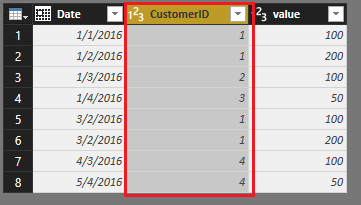
I have got 2 tables with different columns, but wto columns are same, date and customerID. I would like to do distinctcount to count all customerIDs from these two tables.


dc.PNG

As shown in the picture, correct result I am expecting is 4.


Any suggestions? Thx

1 ACCEPTED SOLUTION
sdjensen
Solution Sage
Solution Sage

Hi @mstefancik,


You could try this:


First calculate a new table having the values of CustomerID from Table1 and Table2

Table = UNION (VALUES( 'Table1'[CustomerID] ), VALUES (Table2[CustomerID] ) )


And then create a measure that counts the distinct values in the new table

Distinct Customers = DISTINCTCOUNT('Table'[CustomerID])


/sdjensen

View solution in original post

3 REPLIES 3
v-qiuyu-msft
Community Support
Community Support

Hi @mstefancik,


In addition, you can also use "Append Queries" feature in Query Editor to append Table2 to Table1. The new table looks like below:

z1.PNG

z2.PNG


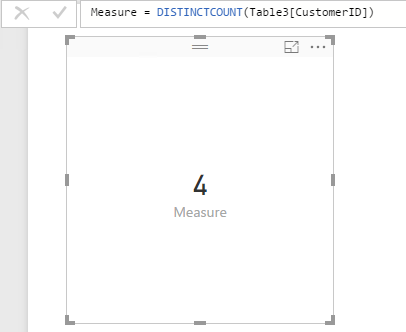
Then create a measure to return the count of distinct values:


z3.PNG


If you have any question, please feel free to ask.


Best Regards,
Qiuyun Yu

Community Support Team _ Qiuyun Yu
If this post helps, then please consider Accept it as the solution to help the other members find it more quickly.
sdjensen
Solution Sage
Solution Sage

Hi @mstefancik,


You could try this:


First calculate a new table having the values of CustomerID from Table1 and Table2

Table = UNION (VALUES( 'Table1'[CustomerID] ), VALUES (Table2[CustomerID] ) )


And then create a measure that counts the distinct values in the new table

Distinct Customers = DISTINCTCOUNT('Table'[CustomerID])


/sdjensen

An alternative solution could be to select the distinct values into you table and then just create a count of the rows in your new table - I would suspect this approach to be faster, but you really need to test this.


Table:

Table = DISTINCT( UNION (VALUES( 'Table1'[CustomerID] ); VALUES (Table2[CustomerID] ) ) )

Measure:

Distinct Customers = COUNTROWS('Table')
/sdjensen

Helpful resources

Announcements
FabCon and SQLCon Barcelona 2026

FabCon & SQLCon – Barcelona 2026

Join us in Barcelona for FabCon and SQLCon, the Fabric, Power BI, SQL, and AI community event. Save €200 with code FABCMTY200.

60 days of Data Days Carousel

Data Days 2026

Join Fabric Data Days 2026: 60 days of free live/on-demand sessions, challenges, study groups, and certification opportunities.

Power BI DataViz World Championships carousel

Power BI DataViz World Championships - June 2026

A new Power BI DataViz World Championship is coming this June! Don't miss out on submitting your entry.