cancel
Showing results for 
Search instead for 
Did you mean: 

Did you hear? There's a new SQL AI Developer certification (DP-800). Start preparing now and be one of the first to get certified. Register now

Reply
Analitika
Post Prodigy
Post Prodigy

Distinctcount ALL

Why not working this measure?


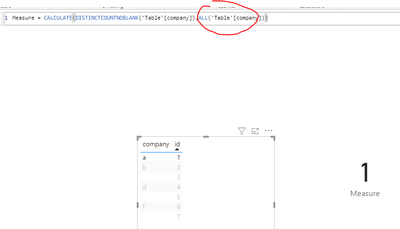
m_CountOfCompanies = CALCULATE(DISTINCTCOUNTNOBLANK(_op[Company]),ALL(_op[Company]))
m_CountOfClients = CALCULATE(DISTINCTCOUNTNOBLANK(_op[Clients]),ALL(_op[Clients]))
 
I have to matrix in first i want to show Client Name | m_CountOfCompanies
in second i want to show Company Name | m_CountOfClients
 
so it working good only if nothing selected, if i select first company name in other matriz i see all this company clients but under each client column everyon client have 1 but i need to count all each clients companies count
1 ACCEPTED SOLUTION
Anonymous
Not applicable

Hi @Analitika ,


Based on my test, you just need to modify "ALL(_op[Clients])" to "ALL(_op)".

m_CountOfCompanies = CALCULATE(DISTINCTCOUNTNOBLANK(_op[Company]),ALL(_op))

m_CountOfClients = CALCULATE(DISTINCTCOUNTNOBLANK(_op[Clients]),ALL(_op))

3.PNG2.PNG


Best Regards,

Jay

View solution in original post

3 REPLIES 3
Anonymous
Not applicable

Hi @Analitika ,


Based on my test, you just need to modify "ALL(_op[Clients])" to "ALL(_op)".

m_CountOfCompanies = CALCULATE(DISTINCTCOUNTNOBLANK(_op[Company]),ALL(_op))

m_CountOfClients = CALCULATE(DISTINCTCOUNTNOBLANK(_op[Clients]),ALL(_op))

3.PNG2.PNG


Best Regards,

Jay

CNENFRNL
Community Champion
Community Champion

Hi, @Analitika , pls keep in mind that filters propogate along with relationships, if any, among tables in the data model.


m_CountOfClients =
CALCULATE ( DISTINCTCOUNTNOBLANK ( _op[Clients] ), ALL ( _op[Clients] ) )


Even if filters on _op[Clients] were removed by ALL(), filters from other matrix on other columns in table _op remain effective; which in turn affect the calculation of DISTINCTCOUNTNOBLANK().


Thanks to the great efforts by MS engineers to simplify syntax of DAX! Most beginners are SUCCESSFULLY MISLED to think that they could easily master DAX; but it turns out that the intricacy of the most frequently used RANKX() is still way beyond their comprehension!

DAX is simple, but NOT EASY!

amitchandak
Super User
Super User

@Analitika , Can you share sample data and sample output in table format? Or a sample pbix after removing sensitive data.

Share with Power BI Enthusiasts: Full Power BI Video (20 Hours) YouTube
Microsoft Fabric Series 60+ Videos YouTube
Microsoft Fabric Hindi End to End YouTube

Helpful resources

Announcements
April Power BI Update Carousel

Power BI Monthly Update - April 2026

Check out the April 2026 Power BI update to learn about new features.

Fabric SQL PBI Data Days

Data Days 2026 coming soon!

Sign up to receive a private message when registration opens and key events begin.

New to Fabric survey Carousel

New to Fabric Survey

If you have recently started exploring Fabric, we'd love to hear how it's going. Your feedback can help with product improvements.

Power BI DataViz World Championships carousel

Power BI DataViz World Championships - June 2026

A new Power BI DataViz World Championship is coming this June! Don't miss out on submitting your entry.