cancel
Showing results for 
Search instead for 
Did you mean: 

The Power BI Data Visualization World Championships is back! Get ahead of the game and start preparing now! Learn more

Reply
sthomas38
Frequent Visitor

Distinct values for a Ranking measure

Hi All,

I am trying to get a calculated measure for rank. When I use SKIP and DENSE, I do not get what I expect.

My data has the following fields, Network, Provider ID, State, MSA, County and Zip. I need to get a rank measure of the network by Provider Count when filtered by State, MSA, County and Zip. It is a very simple requirement, but I couldn't find this any of the forums.

Data.jpg

Please help. Thank you in advance for your time and help.


1 ACCEPTED SOLUTION
sthomas38
Frequent Visitor

I found a solution from youtube - alphabetical rank calculation. 

Create a measure such as this -

Alphabetic Rank =

VAR _curNetwork = SELECTEDVALUE(Table[Network])

VAR res = COUNTROWS( FILTER( ALL(Table[Network]), Table[Network] <= _curNetwork ) )

RETURN res  


The next rank measure calculation is - 

RANK_ALL = RANKX( ALL(Table[Network]), [Provider Count] + DIVIDE([Alphabetic Rank],100), ,DESC ) 


This works very well - I am able to filter by State, MSA, Region, County and Zip just by using this one calculation. 

Thank you 🙂


View solution in original post

5 REPLIES 5
sthomas38
Frequent Visitor

I found a solution from youtube - alphabetical rank calculation. 

Create a measure such as this -

Alphabetic Rank =

VAR _curNetwork = SELECTEDVALUE(Table[Network])

VAR res = COUNTROWS( FILTER( ALL(Table[Network]), Table[Network] <= _curNetwork ) )

RETURN res  


The next rank measure calculation is - 

RANK_ALL = RANKX( ALL(Table[Network]), [Provider Count] + DIVIDE([Alphabetic Rank],100), ,DESC ) 


This works very well - I am able to filter by State, MSA, Region, County and Zip just by using this one calculation. 

Thank you 🙂


Anonymous
Not applicable

Hi @sthomas38 

You can refer to the following example.

Create a new measure

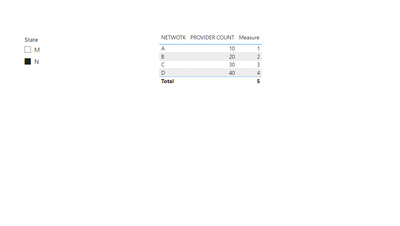
Measure = RANKX(FILTER(ALL('Table'),[State]=MAX([State])),CALCULATE(SUM([PROVIDER COUNT])),,ASC,Dense)

Output

vxinruzhumsft_0-1675302727876.png


Best Regards!

Yolo Zhu

If this post helps, then please consider Accept it as the solution to help the other members find it more quickly.

Hi, thank you for responding. So I will have to create one measure for each filter, right? (Example this will only filter ranks by state). Similarly, I will have to create another measure for MSA, County, Region and Zip? Also the visual cannot have ONE field, multiple calculated rank fields. 

sudhav
Helper V
Helper V

you can use child column i.e NETWORK to get proper ranks

I am sorry, I don't know what that means..?

Helpful resources

Announcements
Power BI DataViz World Championships

Power BI Dataviz World Championships

The Power BI Data Visualization World Championships is back! Get ahead of the game and start preparing now!

December 2025 Power BI Update Carousel

Power BI Monthly Update - December 2025

Check out the December 2025 Power BI Holiday Recap!

FabCon Atlanta 2026 carousel

FabCon Atlanta 2026

Join us at FabCon Atlanta, March 16-20, for the ultimate Fabric, Power BI, AI and SQL community-led event. Save $200 with code FABCOMM.