cancel
Showing results for 
Search instead for 
Did you mean: 

July 7 - July 17 | Round 2 of the Power BI Dataviz World Championships. Don't miss your chance! Learn more

Reply
sthomas38
Frequent Visitor

Distinct values for a Ranking measure

Hi All,

I am trying to get a calculated measure for rank. When I use SKIP and DENSE, I do not get what I expect.

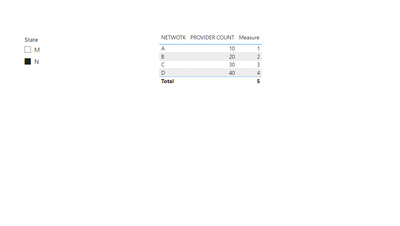
My data has the following fields, Network, Provider ID, State, MSA, County and Zip. I need to get a rank measure of the network by Provider Count when filtered by State, MSA, County and Zip. It is a very simple requirement, but I couldn't find this any of the forums.

Data.jpg

Please help. Thank you in advance for your time and help.


1 ACCEPTED SOLUTION
sthomas38
Frequent Visitor

I found a solution from youtube - alphabetical rank calculation. 

Create a measure such as this -

Alphabetic Rank =

VAR _curNetwork = SELECTEDVALUE(Table[Network])

VAR res = COUNTROWS( FILTER( ALL(Table[Network]), Table[Network] <= _curNetwork ) )

RETURN res  


The next rank measure calculation is - 

RANK_ALL = RANKX( ALL(Table[Network]), [Provider Count] + DIVIDE([Alphabetic Rank],100), ,DESC ) 


This works very well - I am able to filter by State, MSA, Region, County and Zip just by using this one calculation. 

Thank you 🙂


View solution in original post

5 REPLIES 5
sthomas38
Frequent Visitor

I found a solution from youtube - alphabetical rank calculation. 

Create a measure such as this -

Alphabetic Rank =

VAR _curNetwork = SELECTEDVALUE(Table[Network])

VAR res = COUNTROWS( FILTER( ALL(Table[Network]), Table[Network] <= _curNetwork ) )

RETURN res  


The next rank measure calculation is - 

RANK_ALL = RANKX( ALL(Table[Network]), [Provider Count] + DIVIDE([Alphabetic Rank],100), ,DESC ) 


This works very well - I am able to filter by State, MSA, Region, County and Zip just by using this one calculation. 

Thank you 🙂


Anonymous
Not applicable

Hi @sthomas38 

You can refer to the following example.

Create a new measure

Measure = RANKX(FILTER(ALL('Table'),[State]=MAX([State])),CALCULATE(SUM([PROVIDER COUNT])),,ASC,Dense)

Output

vxinruzhumsft_0-1675302727876.png


Best Regards!

Yolo Zhu

If this post helps, then please consider Accept it as the solution to help the other members find it more quickly.

Hi, thank you for responding. So I will have to create one measure for each filter, right? (Example this will only filter ranks by state). Similarly, I will have to create another measure for MSA, County, Region and Zip? Also the visual cannot have ONE field, multiple calculated rank fields. 

sudhav
Helper V
Helper V

you can use child column i.e NETWORK to get proper ranks

I am sorry, I don't know what that means..?

Helpful resources

Announcements
FabCon and SQLCon Barcelona 2026

FabCon & SQLCon – Barcelona 2026

Join us in Barcelona for FabCon and SQLCon, the Fabric, Power BI, SQL, and AI community event. Save €200 with code FABCMTY200.

60 days of Data Days Carousel

Data Days 2026

Join Data Days 2026: 60 days of free live/on-demand sessions, challenges, study groups, and certification opportunities.

Power BI DataViz World Championships carousel

Power BI DataViz World Championships - June 2026

A new Power BI DataViz World Championship is coming this June! Don't miss out on submitting your entry.

Top Solution Authors