FabCon is coming to Atlanta
Join us at FabCon Atlanta from March 16 - 20, 2026, for the ultimate Fabric, Power BI, AI and SQL community-led event. Save $200 with code FABCOMM.
Register now!- Power BI forums
- Get Help with Power BI
- Desktop
- Service
- Report Server
- Power Query
- Mobile Apps
- Developer
- DAX Commands and Tips
- Custom Visuals Development Discussion
- Health and Life Sciences
- Power BI Spanish forums
- Translated Spanish Desktop
- Training and Consulting
- Instructor Led Training
- Dashboard in a Day for Women, by Women
- Galleries
- Data Stories Gallery
- Themes Gallery
- Contests Gallery
- QuickViz Gallery
- Quick Measures Gallery
- Visual Calculations Gallery
- Notebook Gallery
- Translytical Task Flow Gallery
- TMDL Gallery
- R Script Showcase
- Webinars and Video Gallery
- Ideas
- Custom Visuals Ideas (read-only)
- Issues
- Issues
- Events
- Upcoming Events
View all the Fabric Data Days sessions on demand. View schedule
- Power BI forums
- Forums
- Get Help with Power BI
- Desktop
- Distinct of Categories names and Date
- Subscribe to RSS Feed
- Mark Topic as New
- Mark Topic as Read
- Float this Topic for Current User
- Bookmark
- Subscribe
- Printer Friendly Page


- Mark as New
- Bookmark
- Subscribe
- Mute
- Subscribe to RSS Feed
- Permalink
- Report Inappropriate Content
Distinct of Categories names and Date
Hi,
I have 2 columns from other tables of categories names and date.
Example:
| Table1 [Date] | Table2 [Categories names] |
| 1/1/2021 | Sport |
| 1/2/2021 | Sport |
| 1/3/2021 | News |
| 1/4/2021 | News |
| 1/5/2021 | Computers |
- I'm looking for a DAX that will bring me this table
| Table1 [Date] | Table2 [Categories names] |
| 1/1/2021 | Sport |
| 1/3/2021 | News |
| 1/5/2021 | Computers |
Thanks for everyone!
Solved! Go to Solution.


- Mark as New
- Bookmark
- Subscribe
- Mute
- Subscribe to RSS Feed
- Permalink
- Report Inappropriate Content
Hi, @dolevh
You say that the two columns interact with each other, and I have a date column in Table2 by default.

Measure =
CALCULATE (
    MIN ( Table2[Date] ),
    FILTER (
        ALL ( Table2 ),
        Table2[Categories names] = MAX ( Table2[Categories names] )
    )
)
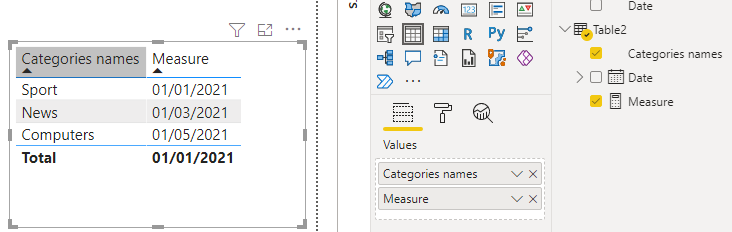
If I don't understand correctly please correct me and tell me what the interrelationship between the two columns is like, thank you.
Best Regards,
Community Support Team _Charlotte
If this post helps, then please consider Accept it as the solution to help the other members find it more.
- Mark as New
- Bookmark
- Subscribe
- Mute
- Subscribe to RSS Feed
- Permalink
- Report Inappropriate Content
Hi, @dolevh
Measure =
IF (
    CALCULATE (
        MIN ( 'Table'[Date] ),
        FILTER (
            ALL ( 'Table' ),
            'Table'[Categories name] = MAX ( 'Table'[Categories name] )
        )
    )
        < DATE ( 2021, 5, 1 ),
    BLANK (),
    MIN ( 'Table'[Date] )
)
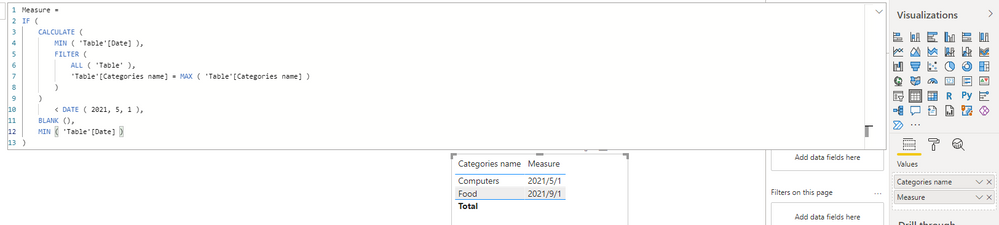
If there are other questions please start a new thread. Thank you!
Best Regards,
Charlotte Zhang
If this post helps, then please consider Accept it as the solution to help the other members find it more quickly.
- Mark as New
- Bookmark
- Subscribe
- Mute
- Subscribe to RSS Feed
- Permalink
- Report Inappropriate Content
Hi, @dolevh
You say that the two columns interact with each other, and I have a date column in Table2 by default.
Measure =
CALCULATE (
    MIN ( Table2[Date] ),
    FILTER (
        ALL ( Table2 ),
        Table2[Categories names] = MAX ( Table2[Categories names] )
    )
)
If I don't understand correctly please correct me and tell me what the interrelationship between the two columns is like, thank you.
Best Regards,
Community Support Team _Charlotte
If this post helps, then please consider Accept it as the solution to help the other members find it more.
- Mark as New
- Bookmark
- Subscribe
- Mute
- Subscribe to RSS Feed
- Permalink
- Report Inappropriate Content
Thanks a lot, it's working!
I want to add a condition for example:
| Date | Categories name |
| 01/01/2021 | Sport |
| 01/02/2021 | Sport |
| 01/07/2021 | Sport |
| 01/08/2021 | Sport |
| 01/01/2021 | News |
| 01/02/2021 | News |
| 01/07/2021 | News |
| 01/05/2021 | Computers |
| 01/06/2021 | Computers |
| 01/07/2021 | Computers |
| 01/09/2021 | Food |
| 01/10/2021 | Food |
| 01/11/2021 | Food |
| Date | Categories name |
| 01/05/2021 | Computers |
| 01/09/2021 | Food |
- Mark as New
- Bookmark
- Subscribe
- Mute
- Subscribe to RSS Feed
- Permalink
- Report Inappropriate Content
Hi, @dolevh
Measure =
IF (
    CALCULATE (
        MIN ( 'Table'[Date] ),
        FILTER (
            ALL ( 'Table' ),
            'Table'[Categories name] = MAX ( 'Table'[Categories name] )
        )
    )
        < DATE ( 2021, 5, 1 ),
    BLANK (),
    MIN ( 'Table'[Date] )
)
If there are other questions please start a new thread. Thank you!
Best Regards,
Charlotte Zhang
If this post helps, then please consider Accept it as the solution to help the other members find it more quickly.
- Mark as New
- Bookmark
- Subscribe
- Mute
- Subscribe to RSS Feed
- Permalink
- Report Inappropriate Content
Thank you!


- Mark as New
- Bookmark
- Subscribe
- Mute
- Subscribe to RSS Feed
- Permalink
- Report Inappropriate Content
@dolevh
Not sure if you have the Date and the Category columns are in one table already. Please try the following new table.
Table New =
ADDCOLUMNS(
    VALUES('Table-06'[Categories names]),
    "Date", CALCULATE( MIN('Table-06'[Date]))
)

⭕ Subscribe and learn Power BI from these videos
⚪ Website ⚪ LinkedIn ⚪ PBI User Group
- Mark as New
- Bookmark
- Subscribe
- Mute
- Subscribe to RSS Feed
- Permalink
- Report Inappropriate Content
It's still not working 😞

The columns from tables are different but there are interactions between them.

Helpful resources

Power BI Monthly Update - November 2025
Check out the November 2025 Power BI update to learn about new features.

Fabric Data Days
Advance your Data & AI career with 50 days of live learning, contests, hands-on challenges, study groups & certifications and more!

FabCon Atlanta 2026
Join us at FabCon Atlanta, March 16-20, for the ultimate Fabric, Power BI, AI and SQL community-led event. Save $200 with code FABCOMM.


