cancel
Showing results for 
Search instead for 
Did you mean: 

The Power BI Data Visualization World Championships is back! Get ahead of the game and start preparing now! Learn more

Reply
tanat_inc
Helper II
Helper II

Distinct count of two column with summarize does not work with userelationship()

Hi community, 

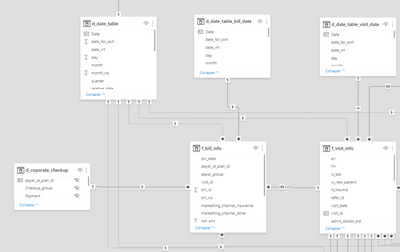
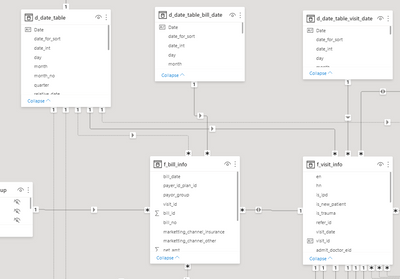
I use DAX code and relation ship below to try to distinctcount by HN and Date. The calculation work well if I have active relationship between  d_date_table[Date]  and  f_visit_info[Date].

Problem is : When I switch relationship between  d_date_table[Date]  and  f_visit_info[Date] to inactive and use userelationship() as the code below, it's does not work.

Campus Visit =
  VAR _table = SUMMARIZE('f_visit_info','f_visit_info'[visit_date],"distinctcount",DISTINCTCOUNTNOBLANK('f_visit_info'[hn]))
RETURN  CALCULATE(
  SUMX(_table,[distinctcount]),
  USERELATIONSHIP('d_date_table'[Date],f_visit_info[visit_date])
)

tanat_inc_0-1620788272033.png


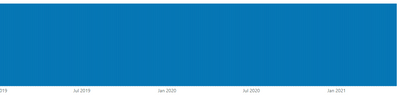
When relationship is intactive, result is as below : 

tanat_inc_1-1620788357210.png

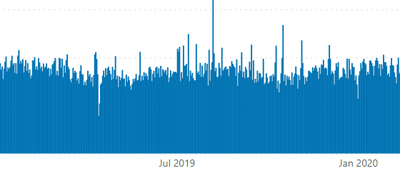
While the same code with active relationship provides the right result as below : 

tanat_inc_2-1620788419940.pngtanat_inc_4-1620788490705.png


How should I rewrite the code to be able to inactivate relation and use "userelationship()" fuction in measure instrad.


1 ACCEPTED SOLUTION
amitchandak
Super User
Super User

@tanat_inc , Try a measure like


Campus Visit =
VAR _table = SUMMARIZE('f_visit_info','f_visit_info'[visit_date],"distinctcount",calculate(DISTINCTCOUNTNOBLANK('f_visit_info'[hn]),
USERELATIONSHIP('d_date_table'[Date],f_visit_info[visit_date])))
RETURN CALCULATE(
SUMX(_table,[distinctcount])
)

Share with Power BI Enthusiasts: Full Power BI Video (20 Hours) YouTube
Microsoft Fabric Series 60+ Videos YouTube
Microsoft Fabric Hindi End to End YouTube

View solution in original post

4 REPLIES 4
amitchandak
Super User
Super User

@tanat_inc , Try a measure like


Campus Visit =
VAR _table = SUMMARIZE('f_visit_info','f_visit_info'[visit_date],"distinctcount",calculate(DISTINCTCOUNTNOBLANK('f_visit_info'[hn]),
USERELATIONSHIP('d_date_table'[Date],f_visit_info[visit_date])))
RETURN CALCULATE(
SUMX(_table,[distinctcount])
)

Share with Power BI Enthusiasts: Full Power BI Video (20 Hours) YouTube
Microsoft Fabric Series 60+ Videos YouTube
Microsoft Fabric Hindi End to End YouTube

It's work !!!

You solved 3 of my issues already in this month. 
That's really save my day.

Thank you very much 🙂 🙂

Anonymous
Not applicable

Hello @tanat_inc ,


You can with lookupvalue


Please find the more information on the below link

https://dax.guide/lookupvalue/

Thanks friend, this should be a useful alternative work around.

Helpful resources

Announcements
Power BI DataViz World Championships

Power BI Dataviz World Championships

The Power BI Data Visualization World Championships is back! Get ahead of the game and start preparing now!

December 2025 Power BI Update Carousel

Power BI Monthly Update - December 2025

Check out the December 2025 Power BI Holiday Recap!

FabCon Atlanta 2026 carousel

FabCon Atlanta 2026

Join us at FabCon Atlanta, March 16-20, for the ultimate Fabric, Power BI, AI and SQL community-led event. Save $200 with code FABCOMM.