cancel
Showing results for 
Search instead for 
Did you mean: 

Level up your Power BI skills this month - build one visual each week and tell better stories with data! Get started

Reply
sadhnabatra
Frequent Visitor

Distinct count not working for multiple filter selection

Count.PNG


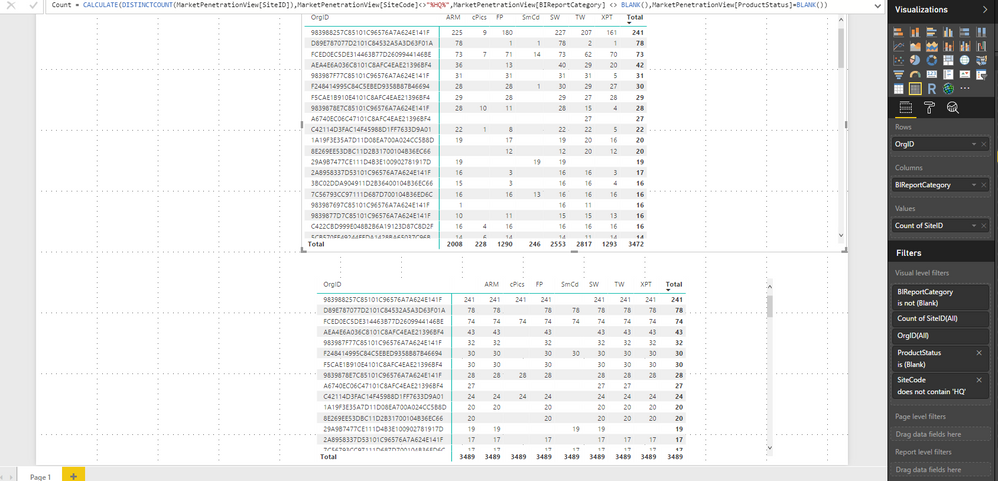
I am trying to replicate the first table using a measure in the second table. Unfortunately the distinct count is not broken down as it is in the first table.


In the first table I have applied all the fiter in the visual but in the second table I have used a measure to apply those measure. I am not sure what I am doing wrong.


Any help is immensely appreciated.


Thanks!


3 REPLIES 3
v-jiascu-msft
Microsoft Employee
Microsoft Employee

Hi @sadhnabatra,


The wildcard wouldn't work here. You can try this formula.

count =
CALCULATE (
    DISTINCTCOUNT ( MarketPenetrationView[SiteID] ),
    FILTER (
        MarketPenetrationView,
        SEARCH ( "HQ", [SiteCode], 1, 0 ) = 0
            && NOT ISBLANK ( MarketPenetrationView[BIReportCategory] )
            && ISBLANK ( MarketPenetrationView[ProductStatus] )
    )
)

If this doesn't work, please provide a sample in text mode. (pbix file would be great. )


Best Regards!

Dale

Community Support Team _ Dale
If this post helps, then please consider Accept it as the solution to help the other members find it more quickly.

Thank you @v-jiascu-msft Dale! This seems to work but somehow the performance of the visual has drastically downgraded.


Do you have any suggestion to improve it? Could it be because of the seach function in the measure?

Hi @sadhnabatra,


There are too many conditions in the FILTER and also the nested Search function. We can try to add a new calculated column of SEARCH in the table. The computation would be downgrade.

ifHQ =
SEARCH ( "HQ", [SiteCode], 1, 0 ) 
count =
CALCULATE (
    DISTINCTCOUNT ( MarketPenetrationView[SiteID] ),
    FILTER (
        MarketPenetrationView,
        MarketPenetrationView[ifHQ] = 0
            && NOT ISBLANK ( MarketPenetrationView[BIReportCategory] )
            && ISBLANK ( MarketPenetrationView[ProductStatus] )
    )
)

Best Regards!

Dale

Community Support Team _ Dale
If this post helps, then please consider Accept it as the solution to help the other members find it more quickly.

Helpful resources

Announcements
April Power BI Update Carousel

Power BI Monthly Update - April 2026

Check out the April 2026 Power BI update to learn about new features.

Fabric SQL PBI Data Days

Data Days 2026 coming soon!

Sign up to receive a private message when registration opens and key events begin.

New to Fabric survey Carousel

New to Fabric Survey

If you have recently started exploring Fabric, we'd love to hear how it's going. Your feedback can help with product improvements.

Power BI DataViz World Championships carousel

Power BI DataViz World Championships - June 2026

A new Power BI DataViz World Championship is coming this June! Don't miss out on submitting your entry.