This time we’re going bigger than ever. Fabric, Power BI, SQL, AI and more. We're covering it all. You won't want to miss it.
Learn moreLevel up your Power BI skills this month - build one visual each week and tell better stories with data! Get started
Hi,
I'm pretty new to Power BI.
I have created a project status dashboard in Power BI Desktop. My data is being pulled from a Sharepoint online list.
My online list columns are as follows:
Country | Vertical | Categories | Project Title | Project Stage | IT Owner | Status
The IT Owner column is an AD lookup field so as to easily enter a person's name.
On my dashboard, I have a stacked column chart visualization for Project Status by IT Owner.
In some cases, there might be several IT Owners for the same project.
I have attached two screenshots for example:
For the above example, the visualization treats the same IT owner (Bino Balan) as two different values. How can I pull distinct names from a group of IT owners in this example and add the status count to their individual names?
Thanks!
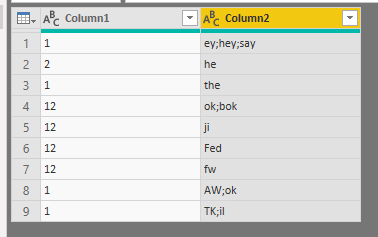
For a project including 3 people i'd say you need to create 2 additional rows. This can be done by a combination of split column and unpivot:
Starting table
Split column by ";"
Highlight your new columns and then press unpivot.
You should get a row for each participant in each project.
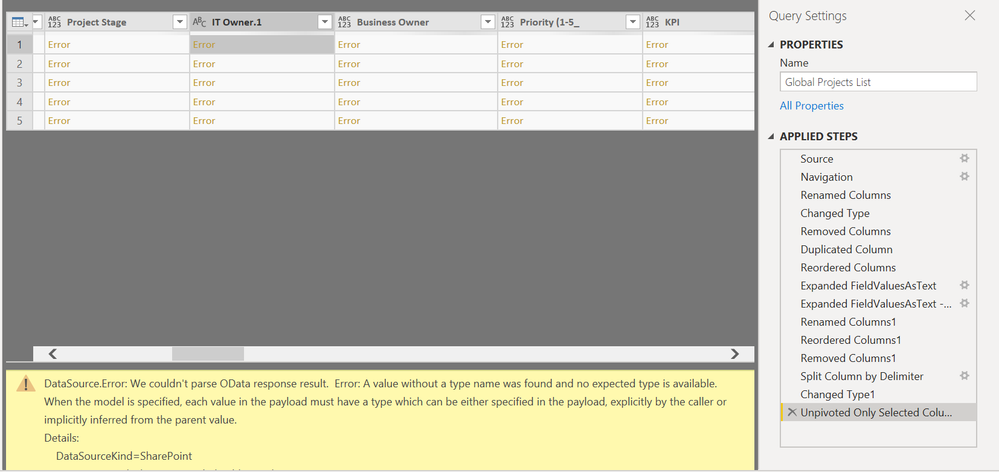
I was able to split the columns but unpivoting the new columns caused the new columns to disappear and the following error:
DataSource.Error: We couldn't parse OData response result. Error: A value without a type name was found and no expected type is available. When the model is specified, each value in the payload must have a type which can be either specified in the payload, explicitly by the caller or implicitly inferred from the parent value.
Details:
DataSourceKind=SharePoint
DataSourcePath=https://#######/sites/it
Check out the April 2026 Power BI update to learn about new features.
Sign up to receive a private message when registration opens and key events begin.
If you have recently started exploring Fabric, we'd love to hear how it's going. Your feedback can help with product improvements.
| User | Count |
|---|---|
| 35 | |
| 26 | |
| 26 | |
| 22 | |
| 18 |
| User | Count |
|---|---|
| 66 | |
| 36 | |
| 32 | |
| 26 | |
| 23 |