Join us in Barcelona for FabCon and SQLCon, September 28 - October 1, 2026.
This is best Fabric, Power BI, SQL and AI community event. How do we know? The last event sold out! Save €200 with code FABCMTY200.
Register now- Power BI forums
- Get Help with Power BI
- Desktop
- Service
- Report Server
- Power Query
- Mobile Apps
- Developer
- DAX Commands and Tips
- Custom Visuals Development Discussion
- Health and Life Sciences
- Power BI Spanish forums
- Translated Spanish Desktop
- Training and Consulting
- Instructor Led Training
- Dashboard in a Day for Women, by Women
- Galleries
- Data Stories Gallery
- Themes Gallery
- Contests Gallery
- QuickViz Gallery
- Quick Measures Gallery
- Visual Calculations Gallery
- Fabric Apps Gallery
- Notebook Gallery
- Translytical Task Flow Gallery
- TMDL Gallery
- R Script Showcase
- Webinars and Video Gallery
- Ideas
- Custom Visuals Ideas (read-only)
- Issues
- Issues
- Events
- Upcoming Events
The Fabric community is now in read-only for platform upgrade. Learn more
- Power BI forums
- Forums
- Get Help with Power BI
- Desktop
- Re: Distinct Identifier
- Subscribe to RSS Feed
- Mark Topic as New
- Mark Topic as Read
- Float this Topic for Current User
- Bookmark
- Subscribe
- Printer Friendly Page


- Mark as New
- Bookmark
- Subscribe
- Mute
- Subscribe to RSS Feed
- Permalink
Distinct Identifier
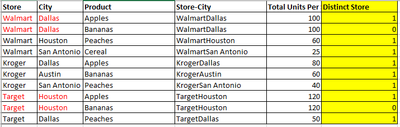
I have a dataset which i need to add a column that labels whether or not a store location is unique. When a store has multiple products my data is providing the total units for all products in the column next for both products, effectively doubling the number. So for WalmartDallas, only 100 total products were sold - it may have been 70 apples and 30 bananas, we dont know. But if you were to sum the total units column, it would appear this store sold 200 total units which is incorrect.
What i wan to create is the highlighted column. I know for specific calculations I could just do an average total units per distinct store-city, but for other applications it would be eaisier to have the identifying column.
Solved! Go to Solution.


- Mark as New
- Bookmark
- Subscribe
- Mute
- Subscribe to RSS Feed
- Permalink
Infact the formula can be reduced to following. If you need result as Binary, you can chantge the data type to Binary from the Modelling tab>>formatting section. 1 is equivalent to TRUE, 0 is equivalent to FALSE
Column Formula =
VAR myrank =
    RANKX (
        CALCULATETABLE (
            'TableName',
            ALLEXCEPT ( 'TableName', 'TableName'[Store], 'TableName'[City] )
        ),
        [Product],
        ,
        ASC,
        DENSE
    )
RETURN
    IF ( myrank = 1, 1, 0 )
Regards
Zubair
Please try my custom visuals
- Mark as New
- Bookmark
- Subscribe
- Mute
- Subscribe to RSS Feed
- Permalink
Try this as a Calculated Column
Column =
VAR IsUnique =
    CALCULATE (
        COUNTROWS ( 'TableName' ),
        ALLEXCEPT ( 'TableName', 'TableName'[Store], 'TableName'[City] )
    ) = 1
RETURN
    IF (
        IsUnique,
        1,
        RANKX (
            CALCULATETABLE (
                'TableName',
                ALLEXCEPT ( 'TableName', 'TableName'[Store], 'TableName'[City] )
            ),
            [Product],
            ,
            DESC,
            DENSE
        ) - 1
    )
Regards
Zubair
Please try my custom visuals
- Mark as New
- Bookmark
- Subscribe
- Mute
- Subscribe to RSS Feed
- Permalink
@Zubair_Muhammad This is almost accurate. I have a lot values that end up as 2 or more. One goes up to 23. Is it possible to make it a bianary result like a Yes or No?
- Mark as New
- Bookmark
- Subscribe
- Mute
- Subscribe to RSS Feed
- Permalink
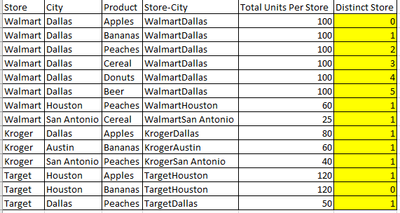
@Zubair_Muhammad So this is the result i'm getting. When really i need the first instance of a store location to read as 1 and all the other instances to read as 0. Sorry for not explaining that at the top, my bad!
- Mark as New
- Bookmark
- Subscribe
- Mute
- Subscribe to RSS Feed
- Permalink
Sorry for late reply. Here is the revised formula
Column =
VAR IsUnique =
    CALCULATE (
        COUNTROWS ( 'TableName' ),
        ALLEXCEPT ( 'TableName', 'TableName'[Store], 'TableName'[City] )
    ) = 1
RETURN
    IF (
        IsUnique,
        1,
        VAR myrank =
            RANKX (
                CALCULATETABLE (
                    'TableName',
                    ALLEXCEPT ( 'TableName', 'TableName'[Store], 'TableName'[City] )
                ),
                [Product],
                ,
                ASC,
                DENSE
            )
        RETURN
            IF ( myrank = 1, 1, 0 )
    )
Regards
Zubair
Please try my custom visuals
- Mark as New
- Bookmark
- Subscribe
- Mute
- Subscribe to RSS Feed
- Permalink
Infact the formula can be reduced to following. If you need result as Binary, you can chantge the data type to Binary from the Modelling tab>>formatting section. 1 is equivalent to TRUE, 0 is equivalent to FALSE
Column Formula =
VAR myrank =
    RANKX (
        CALCULATETABLE (
            'TableName',
            ALLEXCEPT ( 'TableName', 'TableName'[Store], 'TableName'[City] )
        ),
        [Product],
        ,
        ASC,
        DENSE
    )
RETURN
    IF ( myrank = 1, 1, 0 )
Regards
Zubair
Please try my custom visuals

Helpful resources

FabCon & SQLCon – Barcelona 2026
Join us in Barcelona for FabCon and SQLCon, the Fabric, Power BI, SQL, and AI community event. Save €200 with code FABCMTY200.

Power BI DataViz World Championships - June 2026
A new Power BI DataViz World Championship is coming this June! Don't miss out on submitting your entry.

| User | Count |
|---|---|
| 23 | |
| 22 | |
| 14 | |
| 14 | |
| 13 |


| User | Count |
|---|---|
| 47 | |
| 36 | |
| 24 | |
| 20 | |
| 20 |


