cancel
Showing results for 
Search instead for 
Did you mean: 

The Power BI Data Visualization World Championships is back! Get ahead of the game and start preparing now! Learn more

Reply
Anonymous
Not applicable

Distinct Count

I am new to Power BI and I would really appreciate your help


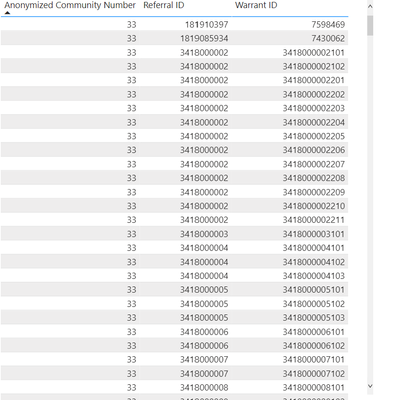
I have a 2 different data sets. I need to do a distinct count: 

escobar02_0-1653187899832.png

So I need to do record count of distinct referrals and distinct warrants by anonymized community name. I am not sure how to go about doing this. Referral ID and Annonymized community name are in 1 data set and warrant id is in another data set but I put it together in the report section. 


I would really appreciate any help on this. It looks simple but I am not sure how to do it since i have not used Power BI before. 


Thank you 


Count from summarised row count 

1 ACCEPTED SOLUTION
v-xiaotang
Community Support
Community Support

Hi  @Anonymous 

Thanks for reaching out to us.

Is there any same key in both datasets? Use it to find related value in another dataset with function filter(). 

You can try code like this, 

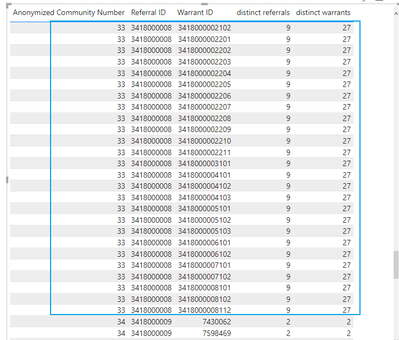
distinct referrals = CALCULATE(DISTINCTCOUNT(Table1[Referral ID]),ALLEXCEPT(Table1,Table1[Anonymized Community Number]))
distinct warrants = CALCULATE(DISTINCTCOUNT(Table2[Warrant ID]),ALLEXCEPT(Table1,Table1[Anonymized Community Number]))
-
In my sample, there is a one-to-one relationship between two tables

reuslt
vxiaotang_0-1653445864212.png


Best Regards,

Community Support Team _Tang

If this post helps, please consider Accept it as the solution to help the other members find it more quickly.

View solution in original post

2 REPLIES 2
v-xiaotang
Community Support
Community Support

Hi  @Anonymous 

Thanks for reaching out to us.

Is there any same key in both datasets? Use it to find related value in another dataset with function filter(). 

You can try code like this, 

distinct referrals = CALCULATE(DISTINCTCOUNT(Table1[Referral ID]),ALLEXCEPT(Table1,Table1[Anonymized Community Number]))
distinct warrants = CALCULATE(DISTINCTCOUNT(Table2[Warrant ID]),ALLEXCEPT(Table1,Table1[Anonymized Community Number]))
-
In my sample, there is a one-to-one relationship between two tables

reuslt

vxiaotang_0-1653445864212.png


Best Regards,

Community Support Team _Tang

If this post helps, please consider Accept it as the solution to help the other members find it more quickly.
ryan_mayu
Super User
Super User

@Anonymous 

try to use DISTINCTCOUNT

https://docs.microsoft.com/en-us/dax/distinctcount-function-dax

it will be better if you can provide some sample data and expected output.


Did I answer your question? Mark my post as a solution!

Proud to be a Super User!


Helpful resources

Announcements
Power BI DataViz World Championships

Power BI Dataviz World Championships

The Power BI Data Visualization World Championships is back! Get ahead of the game and start preparing now!

December 2025 Power BI Update Carousel

Power BI Monthly Update - December 2025

Check out the December 2025 Power BI Holiday Recap!

FabCon Atlanta 2026 carousel

FabCon Atlanta 2026

Join us at FabCon Atlanta, March 16-20, for the ultimate Fabric, Power BI, AI and SQL community-led event. Save $200 with code FABCOMM.