This time we’re going bigger than ever. Fabric, Power BI, SQL, AI and more. We're covering it all. You won't want to miss it.
Learn moreDid you hear? There's a new SQL AI Developer certification (DP-800). Start preparing now and be one of the first to get certified. Register now
I am new to Power BI and I would really appreciate your help
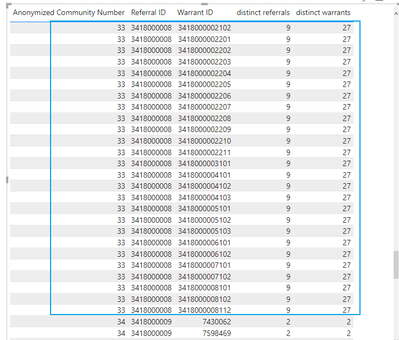
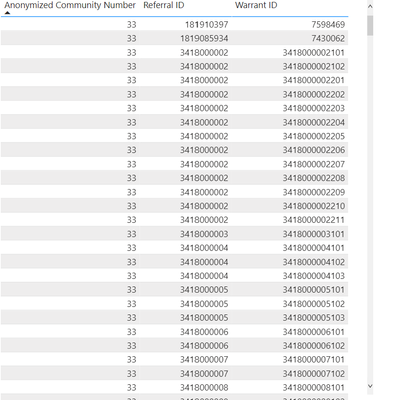
I have a 2 different data sets. I need to do a distinct count:
So I need to do record count of distinct referrals and distinct warrants by anonymized community name. I am not sure how to go about doing this. Referral ID and Annonymized community name are in 1 data set and warrant id is in another data set but I put it together in the report section.
I would really appreciate any help on this. It looks simple but I am not sure how to do it since i have not used Power BI before.
Thank you
Count from summarised row count
Solved! Go to Solution.
Hi @Anonymous
Thanks for reaching out to us.
Is there any same key in both datasets? Use it to find related value in another dataset with function filter().
You can try code like this,
reuslt
Best Regards,
Community Support Team _Tang
If this post helps, please consider Accept it as the solution to help the other members find it more quickly.
Hi @Anonymous
Thanks for reaching out to us.
Is there any same key in both datasets? Use it to find related value in another dataset with function filter().
You can try code like this,
reuslt
Best Regards,
Community Support Team _Tang
If this post helps, please consider Accept it as the solution to help the other members find it more quickly.
@Anonymous
try to use DISTINCTCOUNT
https://docs.microsoft.com/en-us/dax/distinctcount-function-dax
it will be better if you can provide some sample data and expected output.
Proud to be a Super User!
Check out the April 2026 Power BI update to learn about new features.
Sign up to receive a private message when registration opens and key events begin.
If you have recently started exploring Fabric, we'd love to hear how it's going. Your feedback can help with product improvements.
| User | Count |
|---|---|
| 34 | |
| 31 | |
| 30 | |
| 21 | |
| 16 |
| User | Count |
|---|---|
| 61 | |
| 50 | |
| 30 | |
| 23 | |
| 23 |