cancel
Showing results for 
Search instead for 
Did you mean: 

July 7 - July 17 | Round 2 of the Power BI Dataviz World Championships. Don't miss your chance! Learn more

Reply
Anonymous
Not applicable

Distinct Count

I am new to Power BI and I would really appreciate your help


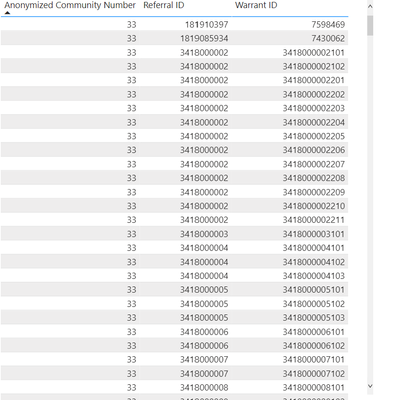
I have a 2 different data sets. I need to do a distinct count: 

escobar02_0-1653187899832.png

So I need to do record count of distinct referrals and distinct warrants by anonymized community name. I am not sure how to go about doing this. Referral ID and Annonymized community name are in 1 data set and warrant id is in another data set but I put it together in the report section. 


I would really appreciate any help on this. It looks simple but I am not sure how to do it since i have not used Power BI before. 


Thank you 


Count from summarised row count 

1 ACCEPTED SOLUTION
v-xiaotang
Community Support
Community Support

Hi  @Anonymous 

Thanks for reaching out to us.

Is there any same key in both datasets? Use it to find related value in another dataset with function filter(). 

You can try code like this, 

distinct referrals = CALCULATE(DISTINCTCOUNT(Table1[Referral ID]),ALLEXCEPT(Table1,Table1[Anonymized Community Number]))
distinct warrants = CALCULATE(DISTINCTCOUNT(Table2[Warrant ID]),ALLEXCEPT(Table1,Table1[Anonymized Community Number]))
-
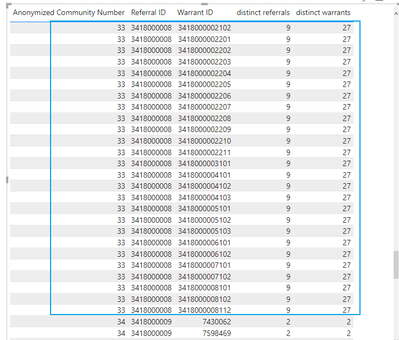
In my sample, there is a one-to-one relationship between two tables

reuslt

vxiaotang_0-1653445864212.png


Best Regards,

Community Support Team _Tang

If this post helps, please consider Accept it as the solution to help the other members find it more quickly.

View solution in original post

2 REPLIES 2
v-xiaotang
Community Support
Community Support

Hi  @Anonymous 

Thanks for reaching out to us.

Is there any same key in both datasets? Use it to find related value in another dataset with function filter(). 

You can try code like this, 

distinct referrals = CALCULATE(DISTINCTCOUNT(Table1[Referral ID]),ALLEXCEPT(Table1,Table1[Anonymized Community Number]))
distinct warrants = CALCULATE(DISTINCTCOUNT(Table2[Warrant ID]),ALLEXCEPT(Table1,Table1[Anonymized Community Number]))
-
In my sample, there is a one-to-one relationship between two tables

reuslt

vxiaotang_0-1653445864212.png


Best Regards,

Community Support Team _Tang

If this post helps, please consider Accept it as the solution to help the other members find it more quickly.

ryan_mayu
Super User
Super User

@Anonymous 

try to use DISTINCTCOUNT

https://docs.microsoft.com/en-us/dax/distinctcount-function-dax

it will be better if you can provide some sample data and expected output.


Did I answer your question? Mark my post as a solution!

Proud to be a Super User!


Helpful resources

Announcements
FabCon and SQLCon Barcelona 2026

FabCon & SQLCon – Barcelona 2026

Join us in Barcelona for FabCon and SQLCon, the Fabric, Power BI, SQL, and AI community event. Save €200 with code FABCMTY200.

60 days of Data Days Carousel

Data Days 2026

Join Fabric Data Days 2026: 60 days of free live/on-demand sessions, challenges, study groups, and certification opportunities.

Power BI DataViz World Championships carousel

Power BI DataViz World Championships - June 2026

A new Power BI DataViz World Championship is coming this June! Don't miss out on submitting your entry.