cancel
Showing results for 
Search instead for 
Did you mean: 

Join the FabCon + SQLCon recap series. Up next: Power BI, Real-Time Intelligence, IQ and AI, and Data Factory take center stage. All sessions are available on-demand after the live show. Register now

Reply
khappersett
Resolver I
Resolver I

Distinct Count with Filter

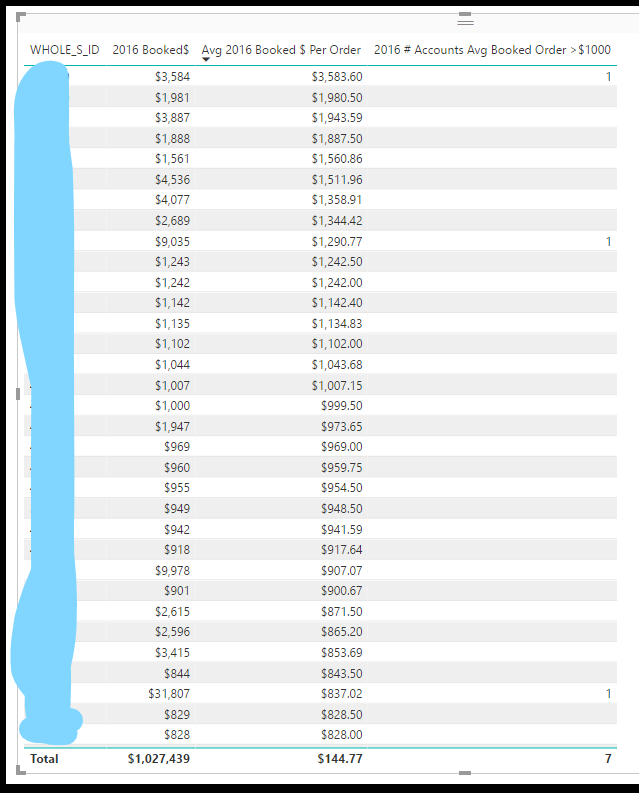
I want to count the number of clients who have an average order amount greater than $1000. In my table, I can clearly see there should be 16, but my counting measure is returning 7 and I have no idea why. You can see the rows it is counting in the table as well.


 table.PNG


2016 # Accounts Avg Booked Order >$1000 = CALCULATE(DISTINCTCOUNT('Order Header-Bookings'[WHOLE_S_ID]), FILTER('Order Detail-Bookings', [Avg 2016 Booked $ Per Order] > 1000))
Avg 2016 Booked $ Per Order = DIVIDE([2016 Booked$], CALCULATE(DISTINCTCOUNT('Order Detail-Bookings'[ORDER_ID]), FILTER('Date Table', [Year] = "2016")))
2016 Booked$ = CALCULATE(sum('Order Detail-Bookings'[BookedDollars]),Filter('Date Table','Date Table'[Year] = "2016"))


Thanks!!

1 ACCEPTED SOLUTION

The problem seems to have been fixed by moving my measures to a different table in my report. Thanks everyone!

View solution in original post

4 REPLIES 4
Anonymous
Not applicable

@khappersett,

I am not able to reproduce your issue using my sample data. Could you please share sample data of  'Order Detail-Bookings' table 'Order Header-Bookings' that can be copied and pasted so that I can test? We also need to know which field you use to create relationship between the  two tables.

Regards,
Lydia

The problem seems to have been fixed by moving my measures to a different table in my report. Thanks everyone!

CahabaData
Memorable Member
Memorable Member

just air code


Count Column > 1000 = IF( [Avg 2016 Booked $ per Order] >= 1000, 1, BLANK() )


should put a 1 when over 1000 that can then be counted.....


www.CahabaData.com

I have thought about doing this but the query I'm pulling is giant (more than 2 million rows of data). I need to do this multiple times for >1000, > 500, <200, and all for 2016 and 2017. If I have to create calculated columns for all of these measures, I'm afraid it would make the report run slow as I already have trouble with memory usage, etc.

Helpful resources

Announcements
April Power BI Update Carousel

Power BI Monthly Update - April 2026

Check out the April 2026 Power BI update to learn about new features.

New to Fabric survey Carousel

New to Fabric Survey

If you have recently started exploring Fabric, we'd love to hear how it's going. Your feedback can help with product improvements.

Power BI DataViz World Championships carousel

Power BI DataViz World Championships - June 2026

A new Power BI DataViz World Championship is coming this June! Don't miss out on submitting your entry.

FabCon and SQLCon Highlights Carousel

FabCon & SQLCon Highlights

Experience the highlights from FabCon & SQLCon, available live and on-demand starting April 14th.