cancel
Showing results for 
Search instead for 
Did you mean: 

Get Fabric Certified for FREE during Fabric Data Days. Don't miss your chance! Request now

Reply
apmulhearn
Helper III
Helper III

Distinct Count of Data Based on Contact ID Relationship and Date Criteria - 2 tables

Hello,


I have  Table1 with Email Event Type Activity, Dates and Contact IDs.

I have Table 2 with ContactID and Reservation Date.

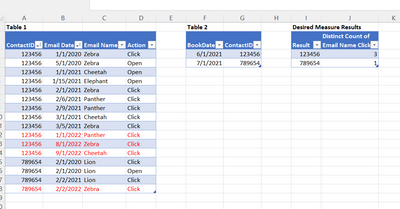
I want to know how many DIFFERENT Email Names a contact CLICKED (Action) BEFORE Their Book Date in Table2.

Thank you for any help.


apmulhearn_1-1668730829797.png

ContactIDEmail DateEmail NameActionBookDateContactIDResultDistinct Count of Email Name Clicks BEFORE Book Date in Table 2

Table 1    Table 2  Desired Measure Results   
     
1234561/1/2020ZebraClick 6/1/2021123456 1234563   
1234565/1/2020ZebraOpen 7/1/2021789654 7896541   
1234561/1/2021CheetahOpen         
1234561/15/2021ElephantOpen         
1234562/1/2021ZebraClick         
1234562/6/2021PantherClick         
1234562/9/2021PantherClick         
1234563/1/2021CheetahClick         
1234563/5/2021ZebraClick         
1234561/1/2022PantherClick         
1234568/1/2022ZebraClick         
1234569/1/2022CheetahClick         
7896542/1/2020LionClick         
7896542/1/2020LionOpen         
7896542/2/2021LionClick         
7896542/2/2022ZebraClick         
             
             
1 ACCEPTED SOLUTION
v-yalanwu-msft
Community Support
Community Support

Hi, @apmulhearn ;

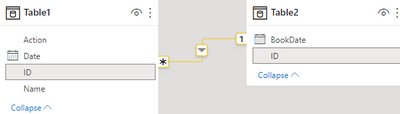
You could check the relationship about two tables:

vyalanwumsft_0-1669014395165.png

Then create a measure.

count = 
CALCULATE(DISTINCTCOUNT('Table1'[Name]),FILTER('Table1',[Action]="Click"&&[Date]>=MAX('Table2'[BookDate])))

The final show:

vyalanwumsft_1-1669014500584.png


Best Regards,
Community Support Team _ Yalan Wu
If this post helps, then please consider Accept it as the solution to help the other members find it more quickly.

View solution in original post

2 REPLIES 2
v-yalanwu-msft
Community Support
Community Support

Hi, @apmulhearn ;

You could check the relationship about two tables:

vyalanwumsft_0-1669014395165.png

Then create a measure.

count = 
CALCULATE(DISTINCTCOUNT('Table1'[Name]),FILTER('Table1',[Action]="Click"&&[Date]>=MAX('Table2'[BookDate])))

The final show:

vyalanwumsft_1-1669014500584.png


Best Regards,
Community Support Team _ Yalan Wu
If this post helps, then please consider Accept it as the solution to help the other members find it more quickly.

amitchandak
Super User
Super User

@apmulhearn , You can join them in Power bi and then can get


distinctcount(Table1[Email]) and plot with contact id or date from table 2


or you https://docs.microsoft.com/en-us/dax/treatas-function

Share with Power BI Enthusiasts: Full Power BI Video (20 Hours) YouTube
Microsoft Fabric Series 60+ Videos YouTube
Microsoft Fabric Hindi End to End YouTube

Helpful resources

Announcements
November Power BI Update Carousel

Power BI Monthly Update - November 2025

Check out the November 2025 Power BI update to learn about new features.

Fabric Data Days Carousel

Fabric Data Days

Advance your Data & AI career with 50 days of live learning, contests, hands-on challenges, study groups & certifications and more!

FabCon Atlanta 2026 carousel

FabCon Atlanta 2026

Join us at FabCon Atlanta, March 16-20, for the ultimate Fabric, Power BI, AI and SQL community-led event. Save $200 with code FABCOMM.

Top Solution Authors
Top Kudoed Authors