Join us at FabCon Atlanta from March 16 - 20, 2026, for the ultimate Fabric, Power BI, AI and SQL community-led event. Save $200 with code FABCOMM.
Register now!Get Fabric Certified for FREE during Fabric Data Days. Don't miss your chance! Request now
Hello,
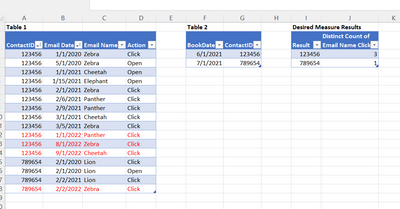
I have Table1 with Email Event Type Activity, Dates and Contact IDs.
I have Table 2 with ContactID and Reservation Date.
I want to know how many DIFFERENT Email Names a contact CLICKED (Action) BEFORE Their Book Date in Table2.
Thank you for any help.
ContactIDEmail DateEmail NameActionBookDateContactIDResultDistinct Count of Email Name Clicks BEFORE Book Date in Table 2
| Table 1 | Table 2 | Desired Measure Results | ||||||||||
| 123456 | 1/1/2020 | Zebra | Click | 6/1/2021 | 123456 | 123456 | 3 | |||||
| 123456 | 5/1/2020 | Zebra | Open | 7/1/2021 | 789654 | 789654 | 1 | |||||
| 123456 | 1/1/2021 | Cheetah | Open | |||||||||
| 123456 | 1/15/2021 | Elephant | Open | |||||||||
| 123456 | 2/1/2021 | Zebra | Click | |||||||||
| 123456 | 2/6/2021 | Panther | Click | |||||||||
| 123456 | 2/9/2021 | Panther | Click | |||||||||
| 123456 | 3/1/2021 | Cheetah | Click | |||||||||
| 123456 | 3/5/2021 | Zebra | Click | |||||||||
| 123456 | 1/1/2022 | Panther | Click | |||||||||
| 123456 | 8/1/2022 | Zebra | Click | |||||||||
| 123456 | 9/1/2022 | Cheetah | Click | |||||||||
| 789654 | 2/1/2020 | Lion | Click | |||||||||
| 789654 | 2/1/2020 | Lion | Open | |||||||||
| 789654 | 2/2/2021 | Lion | Click | |||||||||
| 789654 | 2/2/2022 | Zebra | Click | |||||||||
Solved! Go to Solution.
Hi, @apmulhearn ;
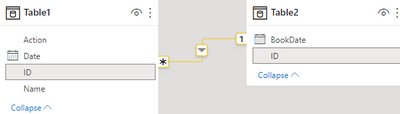
You could check the relationship about two tables:
Then create a measure.
count =
CALCULATE(DISTINCTCOUNT('Table1'[Name]),FILTER('Table1',[Action]="Click"&&[Date]>=MAX('Table2'[BookDate])))
The final show:
Best Regards,
Community Support Team _ Yalan Wu
If this post helps, then please consider Accept it as the solution to help the other members find it more quickly.
Hi, @apmulhearn ;
You could check the relationship about two tables:
Then create a measure.
count =
CALCULATE(DISTINCTCOUNT('Table1'[Name]),FILTER('Table1',[Action]="Click"&&[Date]>=MAX('Table2'[BookDate])))
The final show:
Best Regards,
Community Support Team _ Yalan Wu
If this post helps, then please consider Accept it as the solution to help the other members find it more quickly.
@apmulhearn , You can join them in Power bi and then can get
distinctcount(Table1[Email]) and plot with contact id or date from table 2
or you https://docs.microsoft.com/en-us/dax/treatas-function
Check out the November 2025 Power BI update to learn about new features.
Advance your Data & AI career with 50 days of live learning, contests, hands-on challenges, study groups & certifications and more!