cancel
Showing results for 
Search instead for 
Did you mean: 

The Power BI Data Visualization World Championships is back! Get ahead of the game and start preparing now! Learn more

Reply
John_V12
Frequent Visitor

Distinct Count Filter by Unique Code

Hi everyone,

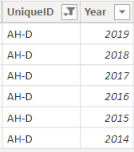
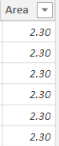
I have a data set with multiple years in a column and I also have the size of the area that is repeating for each year.

John_V12_0-1644919828570.pngJohn_V12_1-1644919860157.png


I want to SUM the Area and then divide by the COUNT of Years per UniqueID.

Can anyone advise the best way to approach this.

Thank you,

1 ACCEPTED SOLUTION
goncalogeraldes
Super User
Super User

Hello there @John_V12 ! Is this what you are looking for?

Sum / Count =
var _num = SUM('Table'[Area])
var _denom = COUNTA('Table'[Year]) /* or DISTINCTCOUNT('Table'[Year]) */

return
DIVIDE( _num, _denom, 0)

Hope this answer solves your problem!
If you need any additional help please @ me in your reply.
If my reply provided you with a solution, please consider marking it as a solution ✔️ or giving it a kudoe 👍
Thanks!

You can also check out my LinkedIn!

Best regards,
Gonçalo Geraldes

View solution in original post

4 REPLIES 4
John_V12
Frequent Visitor

@goncalogeraldes I am looking for the count per UniqueID and not count of all the years in the dataset: E.g for the example I gave in the question should be SUM(table[Area]) and divide by COUNT(table[Year]) Filter by UniqueID.

Hope this makes sense

@John_V12 Power BI calculates every measure on the go depending on the filtering context you provide on the visual. That being said, try using the measure I provided you and putting into a Matrix or Table where the rows values are the UniqueIDs. 


Hope this answer solves your problem!
If you need any additional help please @ me in your reply.
If my reply provided you with a solution, please consider marking it as a solution ✔️ or giving it a kudoe 👍
Thanks!

You can also check out my LinkedIn!

Best regards,
Gonçalo Geraldes

@goncalogeraldes thank you very much.

goncalogeraldes
Super User
Super User

Hello there @John_V12 ! Is this what you are looking for?

Sum / Count =
var _num = SUM('Table'[Area])
var _denom = COUNTA('Table'[Year]) /* or DISTINCTCOUNT('Table'[Year]) */

return
DIVIDE( _num, _denom, 0)

Hope this answer solves your problem!
If you need any additional help please @ me in your reply.
If my reply provided you with a solution, please consider marking it as a solution ✔️ or giving it a kudoe 👍
Thanks!

You can also check out my LinkedIn!

Best regards,
Gonçalo Geraldes

Helpful resources

Announcements
Power BI DataViz World Championships

Power BI Dataviz World Championships

The Power BI Data Visualization World Championships is back! Get ahead of the game and start preparing now!

December 2025 Power BI Update Carousel

Power BI Monthly Update - December 2025

Check out the December 2025 Power BI Holiday Recap!

FabCon Atlanta 2026 carousel

FabCon Atlanta 2026

Join us at FabCon Atlanta, March 16-20, for the ultimate Fabric, Power BI, AI and SQL community-led event. Save $200 with code FABCOMM.