cancel
Showing results for 
Search instead for 
Did you mean: 

The Power BI Data Visualization World Championships is back! It's time to submit your entry. Live now!

Reply
John_V12
Frequent Visitor

Distinct Count Filter by Unique Code

Hi everyone,

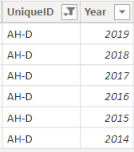
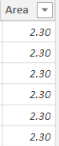
I have a data set with multiple years in a column and I also have the size of the area that is repeating for each year.

John_V12_0-1644919828570.pngJohn_V12_1-1644919860157.png


I want to SUM the Area and then divide by the COUNT of Years per UniqueID.

Can anyone advise the best way to approach this.

Thank you,

1 ACCEPTED SOLUTION
goncalogeraldes
Super User
Super User

Hello there @John_V12 ! Is this what you are looking for?

Sum / Count =
var _num = SUM('Table'[Area])
var _denom = COUNTA('Table'[Year]) /* or DISTINCTCOUNT('Table'[Year]) */

return
DIVIDE( _num, _denom, 0)

Hope this answer solves your problem!
If you need any additional help please @ me in your reply.
If my reply provided you with a solution, please consider marking it as a solution ✔️ or giving it a kudoe 👍
Thanks!

You can also check out my LinkedIn!

Best regards,
Gonçalo Geraldes

View solution in original post

4 REPLIES 4
John_V12
Frequent Visitor

@goncalogeraldes I am looking for the count per UniqueID and not count of all the years in the dataset: E.g for the example I gave in the question should be SUM(table[Area]) and divide by COUNT(table[Year]) Filter by UniqueID.

Hope this makes sense

@John_V12 Power BI calculates every measure on the go depending on the filtering context you provide on the visual. That being said, try using the measure I provided you and putting into a Matrix or Table where the rows values are the UniqueIDs. 


Hope this answer solves your problem!
If you need any additional help please @ me in your reply.
If my reply provided you with a solution, please consider marking it as a solution ✔️ or giving it a kudoe 👍
Thanks!

You can also check out my LinkedIn!

Best regards,
Gonçalo Geraldes

@goncalogeraldes thank you very much.

goncalogeraldes
Super User
Super User

Hello there @John_V12 ! Is this what you are looking for?

Sum / Count =
var _num = SUM('Table'[Area])
var _denom = COUNTA('Table'[Year]) /* or DISTINCTCOUNT('Table'[Year]) */

return
DIVIDE( _num, _denom, 0)

Hope this answer solves your problem!
If you need any additional help please @ me in your reply.
If my reply provided you with a solution, please consider marking it as a solution ✔️ or giving it a kudoe 👍
Thanks!

You can also check out my LinkedIn!

Best regards,
Gonçalo Geraldes

Helpful resources

Announcements
December 2025 Power BI Update Carousel

Power BI Monthly Update - December 2025

Check out the December 2025 Power BI Holiday Recap!

FabCon Atlanta 2026 carousel

FabCon Atlanta 2026

Join us at FabCon Atlanta, March 16-20, for the ultimate Fabric, Power BI, AI and SQL community-led event. Save $200 with code FABCOMM.