cancel
Showing results for 
Search instead for 
Did you mean: 

The Power BI Data Visualization World Championships is back! Get ahead of the game and start preparing now! Learn more

Reply
RalphO
Helper I
Helper I

Distance between start and endtime

Hey all,


I have the following data structure: 


IDTotalDistanceStartTimeEndTime
1100010:00 
11100  
11300  
11400 12:00
1140012:20 
2200014:00 
22200  
22300 14:30
2240015:00 
22400 15:10
35009:00 
3550  
3600 9:20
36009:25 
3630  
3650 9:50


Now, I want to calculate the distance travelled between each start and end time for each ID. How would I go about doing this? If possible in a measure!


Ralph

1 ACCEPTED SOLUTION

Hi @RalphO


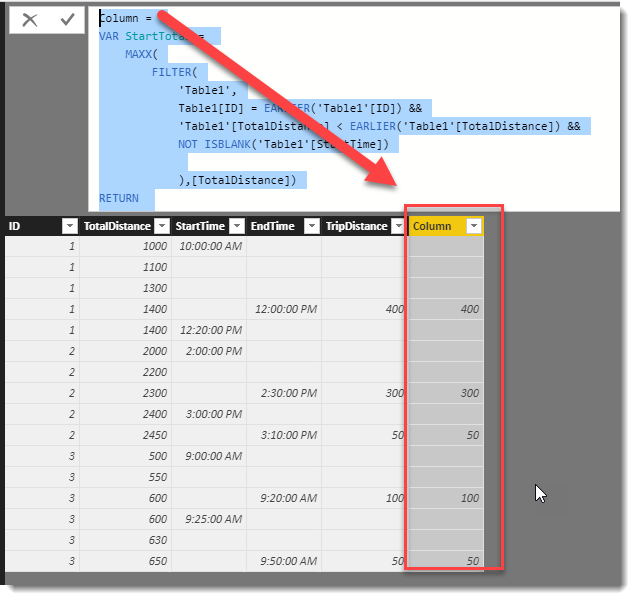
Here is how you can do it with a calculated column.  I have attached a PBIX file


Column = 
VAR StartTotal = 
    MAXX(
        FILTER(
            'Table1',
            Table1[ID] = EARLIER('Table1'[ID]) &&
            'Table1'[TotalDistance] < EARLIER('Table1'[TotalDistance]) &&
            NOT ISBLANK('Table1'[StartTime])
            
            ),[TotalDistance])
RETURN 
    IF(
        NOT ISBLANK('Table1'[EndTime]),
        'Table1'[TotalDistance] - StartTotal
        )

image.png


To learn more about DAX visit : aka.ms/practicalDAX

Proud to be a Datanaut!

View solution in original post

6 REPLIES 6
Phil_Seamark
Microsoft Employee
Microsoft Employee

HI @RalphO


Can you please provide what your expected output would be for that sample set of data.  This will help clarify your requirement.


Cheers,


Phil


To learn more about DAX visit : aka.ms/practicalDAX

Proud to be a Datanaut!

hi @Phil_Seamark


I should look  something like this (A TripDistance value for the other rows should also be fine): 


IDTotalDistanceStartTimeEndTimeTripDistance
1100010:00  
11100   
11300   
11400 12:00400
1140012:20  
2200014:00  
22200   
22300 14:30300
2240015:00  
22450 15:1050
35009:00  
3550   
3600 9:20100
36009:25  
3630   
3650 9:5050


Basically  I want the total distance travelled in each trip, with trip defined as the time between starttime and endtime. 

Hi @RalphO


Here is how you can do it with a calculated column.  I have attached a PBIX file


Column = 
VAR StartTotal = 
    MAXX(
        FILTER(
            'Table1',
            Table1[ID] = EARLIER('Table1'[ID]) &&
            'Table1'[TotalDistance] < EARLIER('Table1'[TotalDistance]) &&
            NOT ISBLANK('Table1'[StartTime])
            
            ),[TotalDistance])
RETURN 
    IF(
        NOT ISBLANK('Table1'[EndTime]),
        'Table1'[TotalDistance] - StartTotal
        )

image.png


To learn more about DAX visit : aka.ms/practicalDAX

Proud to be a Datanaut!

@Phil_Seamark That works, thank you!


For bonus points: do you think it would also be possible to do this with a measure instead of a calculated column?


Hi @RalphO


Yes this would be possible, however a calculated measure needs to know what fields you are using in an axis to help ensure you get the right values.


Would you be using a Table/Matrix visual with the measure?


To learn more about DAX visit : aka.ms/practicalDAX

Proud to be a Datanaut!

@Phil_Seamark I will probably be using a line graph visual for it, with timestamps as the x-axis (one stamp for every 2 seconds, not included in the sample data). Would a measure work for this, or solely for an actual matrix/table?

Helpful resources

Announcements
Power BI DataViz World Championships

Power BI Dataviz World Championships

The Power BI Data Visualization World Championships is back! Get ahead of the game and start preparing now!

December 2025 Power BI Update Carousel

Power BI Monthly Update - December 2025

Check out the December 2025 Power BI Holiday Recap!

FabCon Atlanta 2026 carousel

FabCon Atlanta 2026

Join us at FabCon Atlanta, March 16-20, for the ultimate Fabric, Power BI, AI and SQL community-led event. Save $200 with code FABCOMM.